 How we use AI in our process


Validate Product Flows Before
Development
Turn requirements into a clear structure
Requirements usually come from different sources and with different levels of detail. Wireframing lets you bring this information into a screen structure, so your team can see how each part connects and where the logic still needs discussion.

Align stakeholders around one flow
A clickable prototype gives everyone the same scenario to review. It becomes easier to discuss the actual interaction, especially when product owners, designers, and developers have been interpreting the requirements differently.
Find issues before they reach development
Some gaps only become visible once the screens are connected. A missing state or an unclear transition is easier to detect in a prototype than in a document. UITOP uses this stage to identify these issues, before they become more expensive to revise in development.
Selected Prototyping Metrics
What Clients Say About
UITOP’s Prototyping Service Work


Cole Weiler
CEO, BoltWise“They took way more responsibility than we asked and we were so happy with the results of all their work. UITOP was easy to work with, flexible, and valuable to our company.”


Neil Hosey
ResHub, CTO


Dylan Gambardella
Founder, Different Health“They took extra time to ensure that our frontend developer could easily implement the wireframes.”

Sam Jordan
TrovBase, CEO

Dirk Pauw
CEO, Tavas“We’re most impressed with UITOP’s ability to come up with a system to be able to bring design solutions.”

Jordan Girard
Whiterock, Founder

Jake Heimark
Costa Security, CEO"We are happy with the improved UI/UX, which has made product navigation cleaner, simpler, and more intuitive. The team is great and always there to help."

Michael Mosseri
Total Brokerage, CEO

Nicolas Endress
ClimEase, CEO
Wireframing And Prototyping
Case Studies

WingWork Aviation Maintenance SaaS Redesign
UITOP redesigned WingWork, a B2B SaaS platform for private aviation maintenance. We reworked the product architecture, wireframes, and prototype, then refined major flows for maintenance tracking and inventory management.
The redesigned platform reached a 91 ease-of-use score, cut daily task time by 74%, and reduced data errors by 51%. Task tracking became 3× faster, with compliance accuracy reported at 97%

Valocore Government Contract Finance Platform
We designed and developed Valocore from scratch for US government contractors, starting with architecture and wireframes before moving into a tested prototype.
The finished product supports 6 financial modules, offers one-click audit-ready reports, and built-in federal compliance. Invoice approval and payment cycles became 2× faster, while the platform also reduced the risk of missed deadlines or expired deals.

Aimiable AI Workflow Management Platform
Aimiable came to UITOP with an AI-powered workflow product that needed a stronger product structure and an easier-to-follow interface. The work covered architecture, wireframes, prototype testing, and a scalable design system across 185 screens.
After launch, the product reached a 91 ease-of-use score and 94% user retention. New-user growth increased by 137% in Q1.

Why Teams Choose UITOP
For Prototyping


Our Wireframing And Prototyping
Services
Wireframing And Product Structure
User Flows And Information Architecture
Our wireframing and prototyping services include mapping how users enter a task and what information belongs at each stage. This gives your team a working product structure to review. Roles and permissions are considered inside the flow, so later screen decisions have a reason behind them.
Low-Fidelity Wireframes
We also provide low-fidelity wireframe design services to test screen logic before visual details start influencing decisions. We define hierarchy, content placement, and the order in which users encounter information. Your team receives a version of the interface that is easy to review and inexpensive to revise at this stage.
States And Edge Cases
A flow usually extends beyond its main path. Our team accounts for empty states, errors, permissions, and less common user actions while the product is still being mapped. Seeing these cases helps you discuss how the interface responds and prevents states from being discovered only during implementation.


Interactive Prototyping
Clickable Key Journeys
Once the main screens are connected, we create clickable journeys that let you follow a task from its starting point to completion. This gives stakeholders a more concrete way to review the proposed flow. Feedback often becomes more useful here because everyone is reacting to the same sequence on screen.
Interaction Behavior
Some decisions only become understandable once the interface responds to a click or change in state. Our designers prototype transitions and interface reactions at the level your project requires, offering your team a better sense of timing and behavior before these interactions are handed over for UI design or development.
Prototype Fidelity
Not every project benefits from the same level of prototype detail. We choose fidelity based on what your team plans to review next, whether that is an internal discussion, usability testing, or preparation for UI design. Time is spent where added detail helps answer a real product question.


Validation And Handoff
Stakeholder Reviews
Before the prototype is finalized, we review it with your team against the agreed requirements and business rules. Questions that were difficult to resolve in documents are easier to discuss on actual screens, and feedback can be applied while the flow is still open to revision.
Usability Testing
When access to users or audience representatives is available, UITOP uses the prototype to check how they follow important tasks. Their reactions often reveal places where the intended logic is not as obvious as expected, giving your team useful evidence.
Developer-Ready Documentation
Once the flow is approved, we prepare the prototype for the team taking it further. Screen states and interaction rules are documented alongside the relevant design materials, so developers have enough context to understand how each part of the flow is expected to behave during implementation.


Choose the Right Prototype Fidelity
More detail is useful only when it helps answer the question your team has at that stage. Low-fidelity prototypes are easier to revise while the product logic is still being discussed. As decisions settle, a mid- or high-fidelity version gives you more context for testing and presenting the flow.
The right level also depends on who will use the prototype next. UITOP adjusts fidelity to the purpose of the review, so time is spent on details that support the next decision.

Our Wireframing And Prototyping Process
1. Define The Goal
2. Map Key Flows
3. Create Wireframes
4. Build The Prototype
5. Review And Validate
6. Refine And Handoff
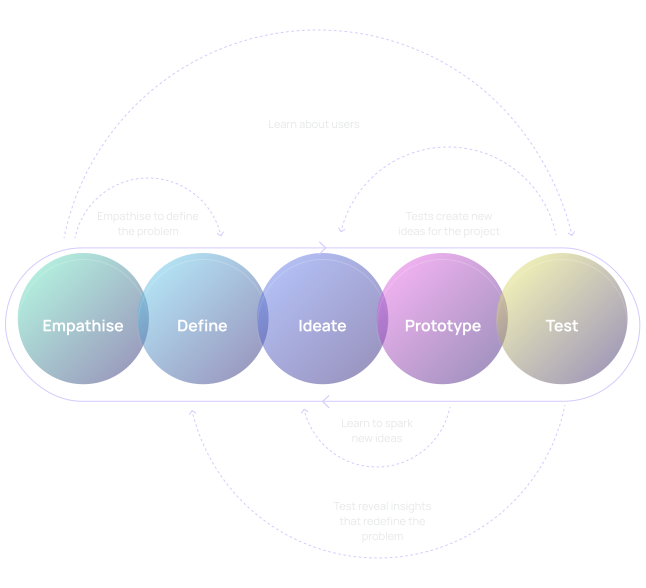
Technologies And Delivery Practices For Prototyping And Wireframing
At UITOP, we choose technologies and delivery practices based on what your team plans to review, test, or hand over next, so the prototype stays useful throughout the product process. Whether you require website wireframing services or a prototype for your SaaS, our agency is here to assist with our skills, experience, and a set of proven tools.


Related Design and Development Services


Frequently Asked Questions
What Is Included In Wireframing And Prototyping Services?
The scope depends on what your product already has and what your team wants to validate. UITOP can cover user flows and information architecture, wireframes, interface states, clickable prototypes, review sessions, and handoff notes. Some projects start from raw requirements, while others come to us with an existing structure that needs refinement.
What Is The Difference Between A Wireframe And A Prototype?
A wireframe defines the structure of a screen: what appears there, how content is organized, and where a user is expected to act. A prototype connects these screens and adds enough behavior to follow a scenario from one stage to another. Wireframes are useful while the product structure is still being discussed. Prototypes become especially useful when your team wants to review interaction logic or put a proposed flow in front of users.
What Level Of Prototype Fidelity Do We Need?
This depends largely on what you plan to learn from the prototype. Early product discussions often benefit from low-fidelity screens because they are faster to revise. If you are testing interaction behavior or preparing for UI design, more detail usually makes sense. UITOP selects the level with your team before production starts, based on the questions the prototype is expected to answer and how it will be used during review.
Can You Test The Prototype With Users?
Yes. If user validation is part of the project, UITOP can prepare the prototype for testing and help organize the research format. The exact setup depends on your audience and whether participants are already available through your team. Testing usually focuses on selected scenarios rather than the entire product. Findings are then reviewed against the prototype, giving the team a grounded basis for deciding which parts of the flow deserve another revision.
What Determines The Timeline And Cost Of A Prototype?
Estimates depend on the amount of product logic that has to be covered and how far the prototype is expected to go. A project with several user roles or many connected scenarios generally takes more effort. Fidelity matters as well, particularly when detailed interaction behavior is included. Review cycles also affect the scope, so our agency evaluates the requirements first and prepares an estimate based on the actual work involved.
What Happens After The Prototype Is Approved?
Once the prototype is approved, it can become the reference for the next product stage. UITOP can continue into UI/UX design or development, depending on the scope of your project. If another team takes over, we prepare the relevant files and supporting documentation for handoff. Some teams also choose another validation round before implementation, particularly when approval has introduced changes that affect an important user flow.