
Design, Product • Feb 03, 2026
 How we use AI in our process Learn more

Imagine you are designing a software-as-a-service (SaaS) platform that starts as a simple internal tool. It has one user type, a few features, and a clear dashboard. Users log in, complete their tasks, and continue working further. The design supports them with clarity and speed. However, once you grow, the picture changes completely.
The platform gets new user roles: administrators, managers, analysts, and external experts. Every customer type performs different duties and requires access to other data. There is no one-size-fits-all dashboard. Interfaces divide into variations. Permissions and approvals should be handled separately. And this is when UX design for SaaS becomes fundamentally different from crafting screens for a minimum viable product (MVP) or a simple application.
You are now handling multiple parallel experiences within a single system. The interface should adapt to every role and scale without fragmenting. The success of the product hugely depends on the well-thought-out system architecture.
So, let’s see how to approach design when scaling, managing multiple roles, and permissions become the core of the experience.
A growing SaaS product can be compared to a carefully chosen gift. You made the best value: powerful functionality, solid technology, and a focus on real user problems. But if you wrap that gift in crumpled paper, with no explanation or clear structure, you risk getting a bad first impression.

At the beginning, SaaS product design is usually optimized for speed and simplicity. There are linear workflows, a single primary user, and full access to all features. But as soon as more people join and business sets the bar higher, the system breaks down, and those typical issues emerge:
When growing, product design for SaaS shifts from isolated screens to system thinking. If complexity is not handled strategically, product owners not only experience usability challenges but also lose trust, efficiency, and operational capability.
A more complex SaaS platform is not necessarily the one with the most advanced features. It is the one that has more relationships. As more people interact with the system, more rules emerge to govern their actions, and more dependencies form based on the data, actions, and outcomes.
Simple platforms serve one user type. Complex SaaS systems need to help admins, operators, managers, analysts, customer support agents, and other stakeholders. Each role has distinct responsibilities, working environments, mental models, and permissions. Thus, the biggest challenge is to design an interface that seamlessly adapts to all the roles.
Permissions are responsible for safety, but most importantly for user experience. The interface structure depends on multiple factors: who can view information, edit data, approve requests, or trigger rules. UI/UX design for SaaS platforms should set clear boundaries as permissions become more granular.
Multiple workflows are running inside complex SaaS platforms. The same feature may behave differently depending on the role, organization, regulatory constraints, and project status. Design should minimize the situations where users are forced to relearn everything because the workflows are not correctly identified and structured.
Data scales together with the product. It becomes richer, with more interconnections and dependencies. For SaaS platform users, those are not just numbers but decision drivers. Thus, the interface should help them understand priority, relevance, and impact.
| Complexity dimension | What it means in practice | UX impact |
|---|---|---|
| User roles | Many user types with different goals and responsibilities | Screens should adapt to serve different user types |
| Permissions and access control | Specific rules defining who can view, edit, approve, and manage data | Design should clearly communicate limitations and capabilities without causing confusion |
| Scenarios and use cases | Features behave differently depending on context | Users should have consistent mental models despite variable systems |
| Data volume and relationships | A large amount of interconnected data is used in decision-making | UX should highlight the relevance and priority of data |
Role-based access control (RBAC) is the foundation of every strong SaaS platform. When designed with proper UX in mind, permissions not only protect data but also help users understand the product and boost confidence in actions they can perform within their role.
The biggest mistake teams can make is to start designing the interface first and then add the layer of permissions. This approach can cause disabled buttons, hidden errors, and users constantly asking why they can’t perform needed actions. Specialists in each role should feel like the whole experience was built for them specifically.

Carefully planned design with RBAC is distinguished by these principles:
A thinking pattern should shift from features and restrictions to responsibilities and outcomes. Below, you can see a simplified example of how RBAC can be implemented from a UX-first perspective.
| Role | Access | UX considerations |
|---|---|---|
| Admin | Full access to all the features and data | Providing full visibility, bulk actions, and clear system indicators |
| Manager | Viewing and editing of the team’s data, approving requests | Building dashboards, approval flows, and a clear impact of actions |
| Operator | Executing tasks, updating records | Offering speed, focus, and minimal distractions |
| Viewer | Read-only access | Clearly providing data with strong visualization and context |
Designing role-based access control in the right way gives your users more confidence when they know what they are responsible for and how to move forward. Such clarity is the driving force of high-quality SaaS product design services and a prerequisite for scalable platforms.
As SaaS platforms scale, user management turns into a set of shared environments where specialists with different goals and responsibilities interact with the same system. Designing for this purpose goes beyond just adding new features. It encompasses structuring experiences that can adapt. Let’s dive deep into how UX designers can execute managing multiple user types and workflows.
When the platform is growing, the primary focus shifts to consistency: in roles, workflows, and teams. Design systems help to solve this challenge, not by standardizing the visuals, but by creating an operational framework for a product’s behavior at scale.

Complex SaaS environments require building UX systems that serve as a single source of truth. If done right, they reduce ambiguity, help with decision-making, and prevent fragmentation.
Teams use these principles to build scalable and practical design systems:
Thus, if applied thoughtfully, a design system becomes a part of business assets. And by using professional web application design services, you can manage complexity, move faster, and ensure your product grows with confidence.
Other factors to consider when building UX design for growing SaaS projects, especially for highly regulated industries, are compliance, governance, and security. They are not just legal concerns but areas that shape how users interact with the system daily.
Security requirements are translated through access controls, authentication flows, audit trails, and data handling. Users should understand why some actions might be restricted for them, and UX should be that confident advisor that communicates boundaries.
Governance adds another layer of complexity to enterprise software design. Approvals, roles hierarchy, version control, and traceability often involve long bureaucratic processes. Thus, UX has to be structured and predictable, with status indicators, explanations, and consistent interaction patterns.
The compliance part dictates how data should be handled and stored, what content can be shown in alignment with regulations, and how ready you are for audits. Design should provide easy traceability of critical actions, correct data processing, and error prevention.
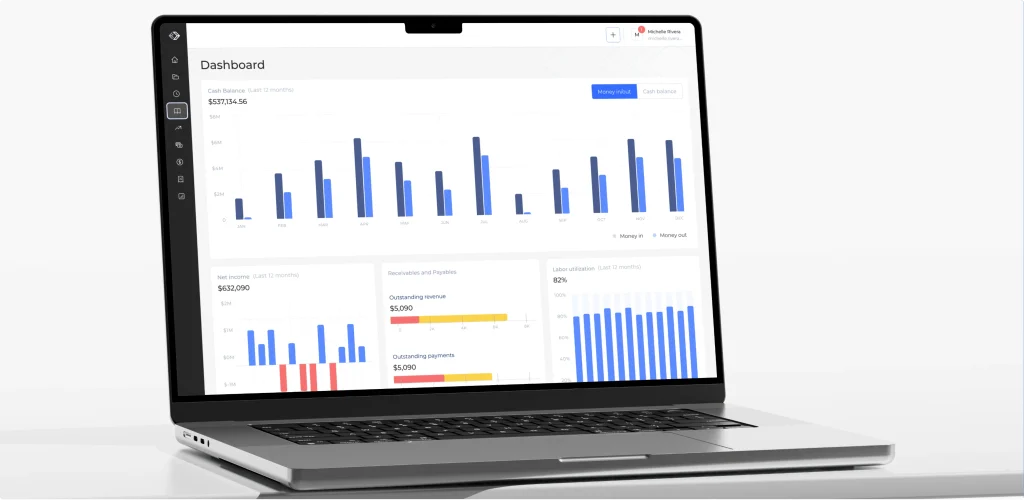
A strong example of this balance is shown in our work on Valocore, a complex SaaS platform for U.S. government contracting. Our main task was to translate highly bureaucratic and compliance-heavy processes into clean design systems. We built uncomplicated interfaces that maintain both strict governance standards and a high level of usability.
UX issues appear gradually as the product grows. In B2B SaaS design, these problems are especially critical because users rely on clarity, efficiency, and predictability in their daily work. So, the most common mistakes are these:

Complexity is an inevitable factor of SaaS platform growth. However, this doesn’t mean poor usability. When scaling, more users join, more data is stored and processed, more rules are applied, and the success of every workflow depends on the properly planned system structure. And UX becomes that uniting factor between advanced functionality and the ways to deliver it.
To build interfaces that serve complex SaaS product user needs, designers should think about building relationships between users and roles, data and outcomes, and actions and permissions. Role-based access, adaptive workflows, and context-aware screens become the core of the design.
The role of properly crafted scalable design systems is not to hide the complexity but introduce it in an organized way. UX should become the infrastructure that supports multiple user roles and remains usable after new deployments and implementations.
You need to create realistic scenarios for each user type. Draw role-specific prototypes, conduct task-based testing, and recreate scenario walkthroughs to identify friction points.
Onboarding is one of the most essential parts of a complex system. These are not just “welcome screens”. They should introduce multi-role functionality, permission scopes, and workflow logic, but while following a progressive disclosure approach.
Enterprise-level users require flexibility to complete their work. However, governance and compliance might present their constraints. UX can balance it out through reversible actions, signals, and guidance without micromanagement.

