AI Agent vs Chatbot vs Workflow Automation: What Should You Build?




Once your team has decided to bring AI into the product or the daily work, the next question is which kind of AI to build. Vendors now sell almost everything as an agent, so the AI agent vs chatbot choice is easy to get wrong. Each of the 3 options fits a different kind of work, and workflow automation often handles that work for less money than the other 2.
In this guide, we compare them side by side with a comparison table, a 3-question test and starting prices from our own projects. We also show how UITOP starts agent work, so you can see what a first release looks like before you commit to one.
AI Agent vs Chatbot vs Workflow Automation at a Glance
A chatbot answers questions in a conversation, while workflow automation runs the same steps every time an event happens. An AI agent works differently, because it reads each case and decides which action to take in your systems.
Anthropic draws the line between the last two in its guide to building effective agents. In a workflow, the model follows code paths written in advance, while in an agent it directs its own process and picks the tools.
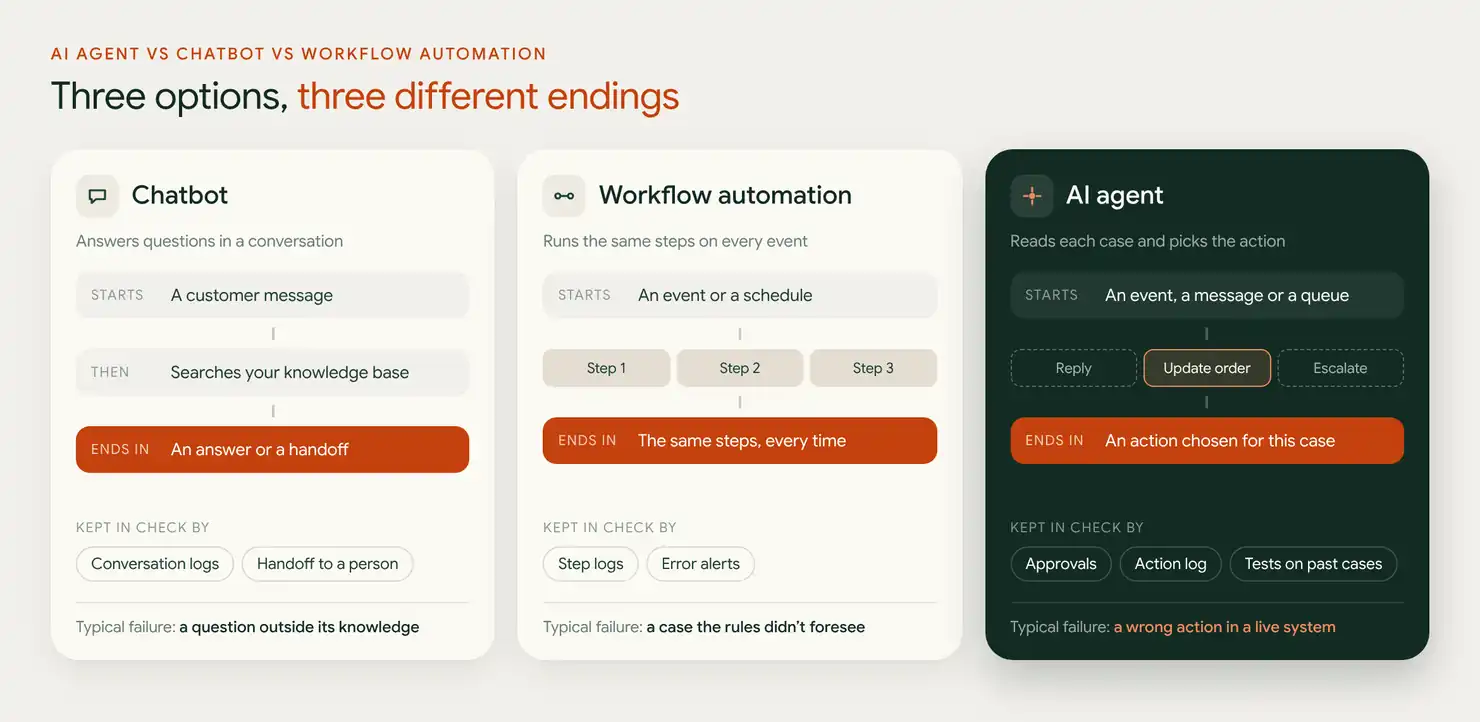
| Chatbot | Workflow automation | AI agent | |
|---|---|---|---|
| The job ends in | An answer | The same set of steps | An action chosen for this case |
| Starts from | A message | An event or a schedule | An event, a message or a queue |
| Who picks the next step | The conversation script or the model | A rule you wrote | The model, within allowed actions |
| Typical failure | A question outside its knowledge | A case the rules didn’t foresee | A wrong action in a live system |
| What keeps it in check | Conversation logs, handoff to a person | Step logs, error alerts | Approvals, an action log, tests on past cases |
What a Chatbot Does Well, and Where It Stops
A chatbot fits when the job ends in an answer, such as questions about orders, policies or your product that your own content can answer.
There are 2 kinds today. A scripted bot follows a decision tree, while an LLM chatbot searches your knowledge base and writes each reply itself. That second setup is known as retrieval-augmented generation (RAG), and both kinds work best in support desks and onboarding flows.
The limit shows up as soon as a person asks the bot to do something. Changing a delivery address or refunding a charge needs access to your order system. Without that access, a chatbot can only explain the steps or hand the person over to your team.
A good chatbot ends every exchange with a clear next step, whether that is an answer, a link to the right page or a handoff to a person. If you are designing the conversation itself, our guide to chatbot UX that keeps people engaged goes deeper.
So start with a chatbot when most requests can be answered from documents you already have.
When Fixed-Rule Workflow Automation Is Enough
If every case follows the same steps, workflow automation is cheaper to build, easier to audit and more predictable than an agent. That is the short explanation of the difference in AI agent vs workflow automation.
A workflow is a trigger followed by fixed steps, such as a new form that creates a record and sends a message to the team. Zapier, n8n, Make, a small script or an RPA bot can run it. It can even contain an AI step, such as sorting an email into one of 5 categories, and still stay a workflow. The model fills one slot, while the rest of the path stays fixed.
Workflows fit work with low variety and high volume, where one wrong step is cheap to fix and auditors see the same path every time.
Workflows break on exceptions, though. Say you run a logistics company across the EU and most delivery changes follow one rule. The rest land in a manual queue that grows every month, and that queue is often the first real job for an agent.
So keep anything with fixed steps in a workflow tool, and track how many cases fall out of it.
What Makes an AI Agent Different
An AI agent plans its next step for each case and acts through the tools and APIs it is allowed to use. That way it can create a ticket, update an order or draft a reply that waits for approval.
A typical run looks like this.
- Read the incoming case, such as a ticket or an email.
- Pull the records this case needs from your CRM, ERP or support desk.
- Choose an action from a fixed list of allowed actions.
- Carry out the action, or send it to a person when the step carries risk.
- Check the result and decide whether the task is finished.
This is the core of the chatbot vs AI agent difference. When a chatbot gets it wrong, you get a bad answer, whereas when an agent gets it wrong, a live record changes.
Anthropic’s guide is open about the trade-off. Agents spend more time and money per task in exchange for flexibility, and their errors can compound. That is why they need sandbox testing and stopping conditions, such as a cap on steps.
In our agent builds, the agent works under its own account with permissions for each role. A second model reviews each planned step before it runs, and every run has a step limit.
So pick an agent only when the next step changes from case to case and someone has defined which actions it may take.
Three Questions That Decide What to Build
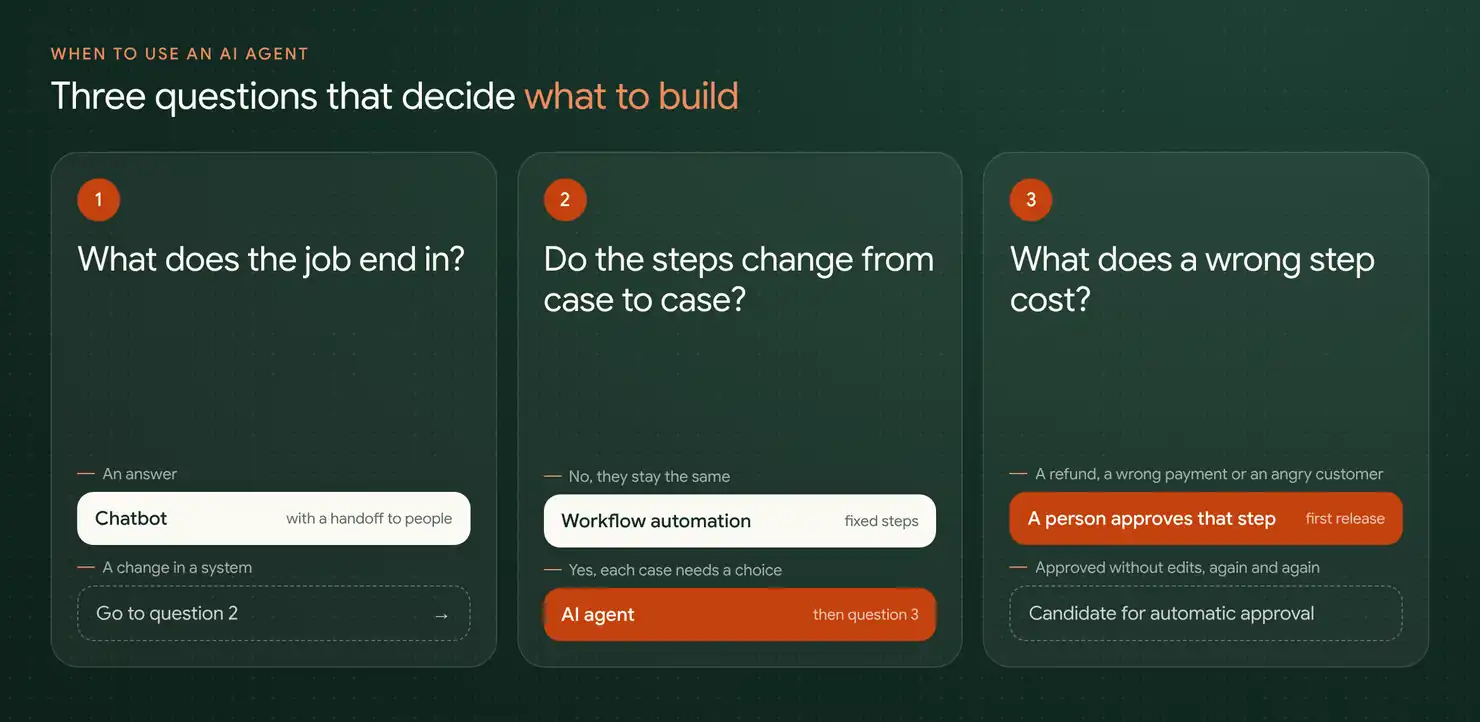
We came up with a simple 3-question test for this choice. Ask what the job ends in, whether the steps change from case to case, and what a wrong step costs. The three answers point to a chatbot, a workflow or an agent, and they tell you when to use an AI agent at all.
- What does the job end in? An answer points to a chatbot. A change in a system points to a workflow or an agent.
- Do the steps change from case to case? If they stay the same, use a workflow. If each case needs reading and a choice between actions, use an agent.
- What does a wrong step cost? If it costs a refund, a wrong payment or an angry customer, the agent starts with a person approving that step.
Here is how it plays out in 3 settings.
A fintech support team in London. Most tickets ask about card limits and transfer times, so a chatbot with a handoff to people fits.
A logistics company across the EU. Delivery changes run through a workflow, and an agent handles the exceptions queue with approval on reroutes.
A US B2B SaaS product. Users ask the product to clean up records for them, so an agent inside the product acts through the product’s own API.
We see the same pattern in the requests that reach us. In about 4 out of 10 cases where a client asks for an AI agent, a chatbot or a workflow tool would do the job better and at a lower cost. We tell potential clients this plainly, before we send any estimate.

Most clients who ask us for an agent have one task they want to stop doing by hand. Once we write out the steps of that task together, it becomes clear which tool fits better.
What Each Option Costs to Build and Run
A workflow is the cheapest of the three to build and run. An agent costs more up front and on every run, since each step is a paid AI request and each release needs testing.
| Option | Starting price at UITOP | What pushes the price up |
|---|---|---|
| Chatbot | from €3,200 | Number of knowledge sources, handoff to people, languages |
| AI agent in a product you run | from €6,400 | Systems and APIs it connects to, approval screens, the state of your data |
| Workflow automation | Tool plans from €20 a month* | Number of tools in the chain and how often its rules change |
*n8n Starter plan, billed annually, as listed on the n8n pricing page in November 2026. Setting up the workflow is a separate cost.
The build is only part of the bill, because an agent’s running cost grows with every extra step that sends a request to a model. From the first test run, we show the cost per task, route simple steps to cheaper models and keep the strongest one for planning.
Support costs differ too, since a workflow needs someone to update its rules. An agent needs a test set of past cases for every release and monitoring once it is live.
A first agent for one job in an existing product takes from 4 weeks. You get a written estimate based on our average rate of €40 an hour before work starts. Our AI agent development team takes you from a first job on paper to a tested agent, with your people approving each risky step.
So price the running cost per task as carefully as the build, especially for an agent.
When You Need a Hybrid of Two or All Three
The choice between AI agents vs workflows is rarely either-or, and most working setups combine all three options. A chatbot talks to people, workflows handle the fixed steps, and an agent takes the cases that need a decision. People approve the steps that carry risk.
The split follows the three questions above. Fixed steps stay in the workflow and cases that need reading go to the agent, while plain-language questions from customers pass through the chatbot first.
Two of our products show smaller versions of this split.
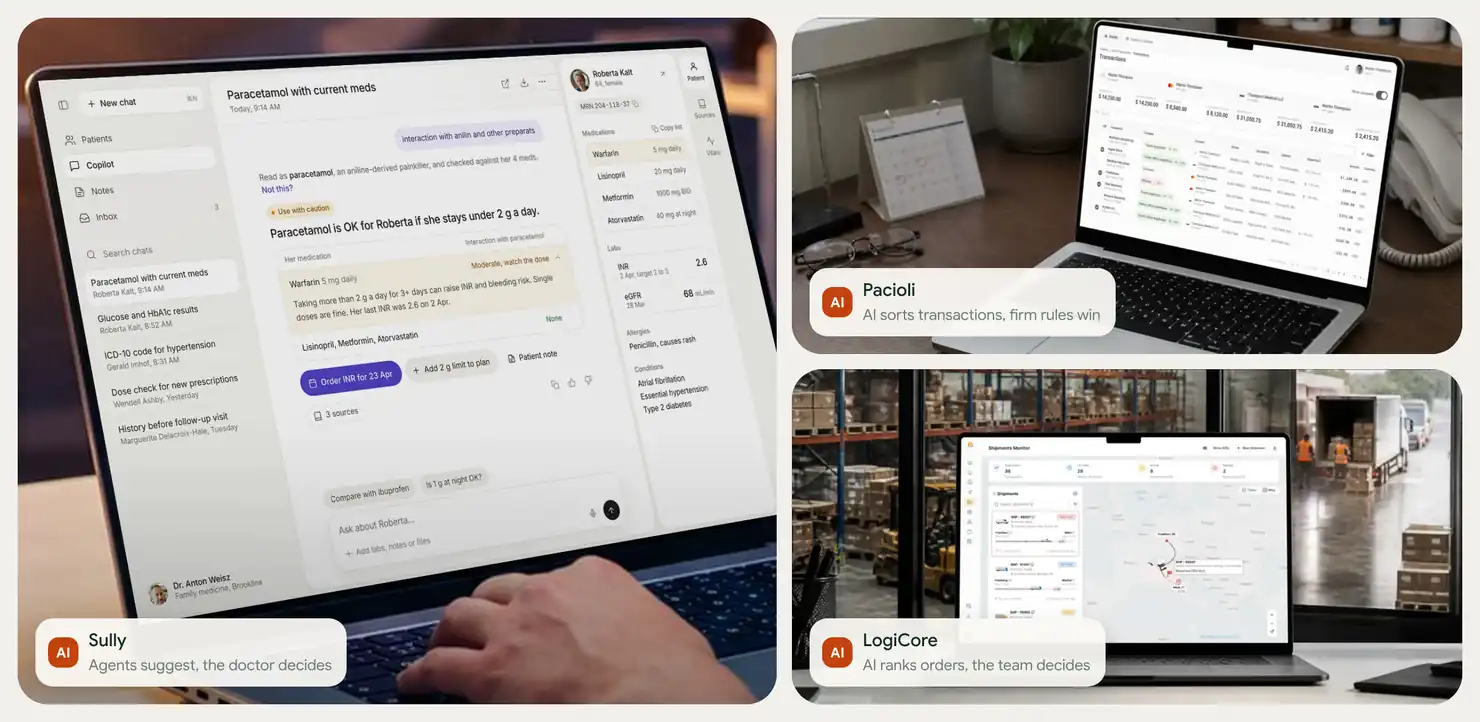
On Pacioli, an accounting platform for healthcare professionals in Canada, transactions arrive from about 97% of Canadian banks. AI places each one in the right account. The accounting firm’s own rules always win over the AI’s choice, so accountants stay in charge.
On LogiCore, an enterprise platform for warehouses and truck fleets, AI ranks incoming orders by urgency, value and delivery details. The warehouse team works from the top of that list, and decision time fell by 43%.
Neither of these is an agent, since both use AI inside fixed rules and leave the final decision to people. That setup can be the right first release.
So map which parts of the process need answers, fixed steps or decisions, and give each part its own tool.
How We Approach AI Agents at UITOP
We start with one job and a first version that suggests actions, while a person on your team confirms each one. For a single task in an existing product, that version takes from 4 weeks. Its access grows only after it proves itself on that job.
Sully is the clearest example from our work. The product runs on a set of agents, each set up for a type of doctor, a diagnosis or a clinical situation. The agents record the full conversation between doctor and patient, split it into parts and fill in the patient’s record. Diagnoses and treatment come as suggestions, and the doctor makes the decision. Sully reached high usage among doctors and closed a Series A.
That split between acting and suggesting is how we plan every agent.
- Pick the job. We choose the task that takes your team the most hours or keeps customers waiting.
- Test on past cases. The agent works through a set of your real cases, messy ones too, before it touches live data.
- Gate the risky steps. Payments, messages to customers and deleted records wait for a person’s approval in the first release.
- Widen access with evidence. A step your team keeps approving without edits becomes a candidate for automatic approval, and you decide when to switch it.
Every action goes into a log with its input, the tools it used and the result, so your team can trace and undo a bad step. The approval screens matter as much as the model, and our article on human-in-the-loop design patterns shows how we design them.
Common Mistakes When Choosing
The most expensive mistake is building an agent for a job that never varies. The second is expecting a chatbot to take actions it was never connected to.
Gartner’s May 2026 forecast has spending on AI agent software more than doubling, from $86.4 billion in 2025 to $206.5 billion in 2026. The same release reports that companies cutting staff after adopting these tools free up budget without getting a return. The return comes from investing in the people who guide and scale the agents.
Four mistakes are worth checking before you start.
- An agent where a workflow fits. You pay for model requests and test runs on a task that a fixed rule handles.
- A chatbot asked to act. It promises a refund it has no access to make, and the customer waits for a person anyway.
- Full autonomy in the first release. Nobody has seen how often the agent picks the right action, yet it already sends messages to customers.
- No test on past cases. The first real test happens on live data.
So write down the job and its steps before you compare tools or vendors.
So, What to Build First
Build a chatbot when the job ends in an answer, and use workflow automation when every case follows the same steps. Build an AI agent when each case needs reading and a choice between actions, and start it with approval on risky steps.
Pick the one task that costs your team the most hours this month and run it through the three questions. If the answer is an agent but you can’t name the task yet, a short product discovery phase is the cheaper first step.