How we use AI in our process

Product, Development
/
Sep 09, 2026
Picture a B2B SaaS product where a finance manager opens the app and finds they can't approve the invoice in their queue because a permission update over the weekend downgraded her role. Or picture the opposite: a new hire logs in for the first time and stumbles into a client's financial records nobody meant for them to see.
Both are the same underlying failure. One wrong permission either locks a person out of work they're supposed to do, or lets them into a corner of the product they were never meant to reach.
Role-based access control, RBAC for short, is the system that decides who gets to see and do what inside a piece of software. Done well, it's designed at the same time as a security model, a business workflow, and an interface people understand. This article walks through what that looks like in practice, and where teams tend to get it wrong.
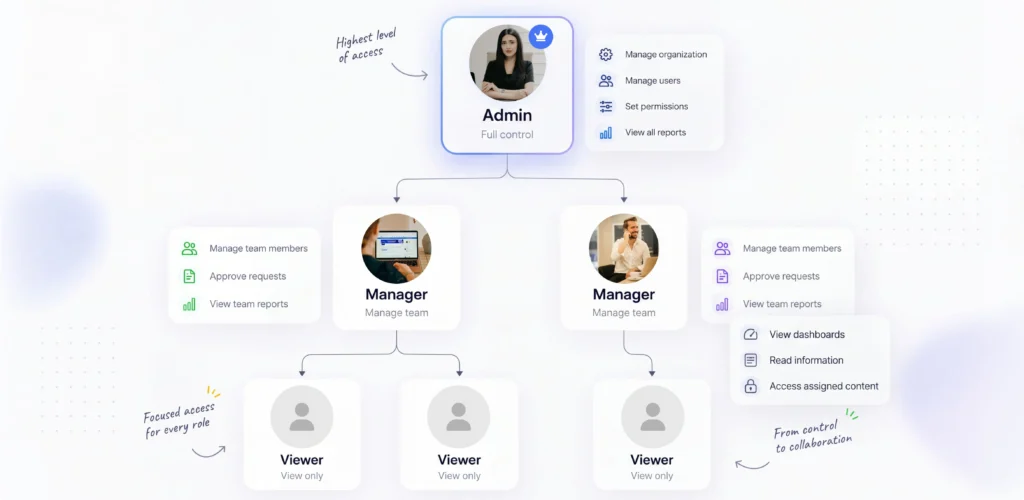
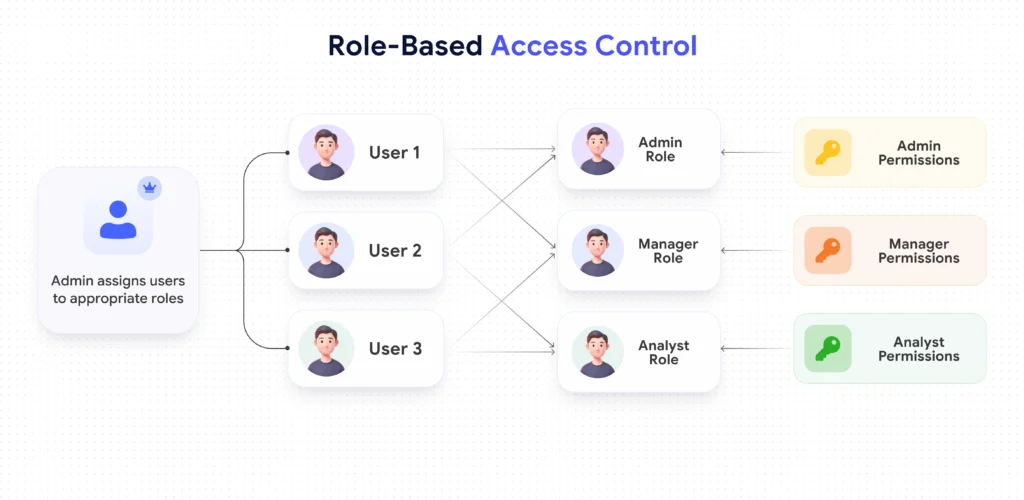
Role based access control SaaS works through five moving parts: users, the roles assigned to them, the permissions attached to those roles, the actions a permission allows, and the resources these actions apply to.
A user doesn't get access directly. They get a role, and the role carries a bundle of permissions with it. The indirection is the entire point. Changing what a Manager is allowed to do updates everyone with this role at once.
It's worth separating a role from two things people often confuse it with. A role isn't a job title. Sales Director describes a position in a company; it says nothing about whether this person needs to edit pricing or only view reports. A role also isn't a single permission. A permission is one specific allowance, like exporting a report. A role is the bundle these permissions get grouped into for a given type of user.
Roles are also allowed to inherit from each other. An Admin role is free to build on top of a Manager role and add a few extra permissions so as not to repeat the whole list. This saves work when it's used for roles that share most of their access. It stops being worth it the moment nobody is able to explain, without opening the settings screen, what a given role actually grants.
A role groups people into a small number of buckets: Admin, Manager, Member, Viewer, whatever fits the product. A permission is granular: view invoices, edit invoices, delete invoices, export invoices. The relationship between the two is many-to-many. One role holds several permissions, and the same permission often shows up inside more than one role.
For a lot of SaaS products, that's the whole model, and it's enough. A support tool where every agent in a given tier does the same job doesn't need anything more elaborate than roles and permissions.
Some products need more. If access has to depend on a factor beyond the role itself, who owns the record, which department it belongs to, whether it's past a certain dollar threshold, roles alone won't cover it.
That's when a team layers in attribute-based rules on top of RBAC: conditions that check the record's owner, its department, or its value before deciding whether the role's permission actually applies here.
It's a note that RBAC is the starting point for almost every SaaS product, and attributes are added only where the business indeed needs a rule that a role can't express on its own.
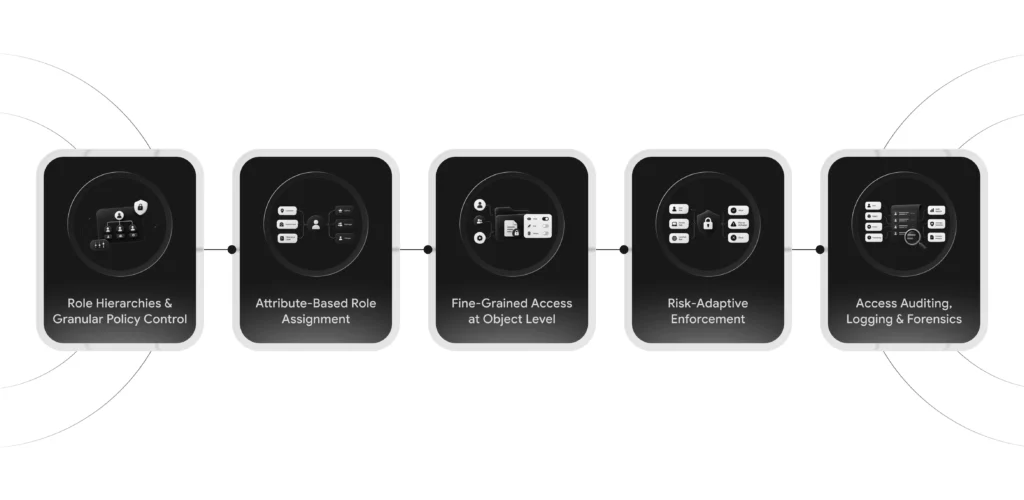
Before any screen is designed, the underlying access model gets built from the actual work being done. An org chart is a poor substitute for that. The sequence looks like this:
Take a project management tool with three roles: Admin, Manager, Member. An Admin manages billing and is the only one able to add or remove people from the account. A Manager creates projects, assigns tasks, and views everyone's time logs inside their own team. A Member sees and edits only the tasks assigned to them, and views the project timeline without editing it.
A few dimensions are missed constantly during this process. Multi-tenant products need every rule checked against tenant boundaries as well as roles within one account. Larger organizations require department-level scoping, since a Manager in Sales shouldn't automatically see records that belong to Support. Record ownership matters on its own: a Manager who created a project often needs different rights over it than a Manager who was simply added to it later. And a short list of high-risk actions, deleting a client account, changing billing details, exporting a full customer list, deserves its own explicit review.
Our team at UITOP ran into exactly this kind of role engineering while building Pacioli, an accounting platform for a Canadian firm serving healthcare clients. The product has two very different user types under one roof: accountants who manage client books and clients who primarily need to connect their bank accounts and let their financial data sync.
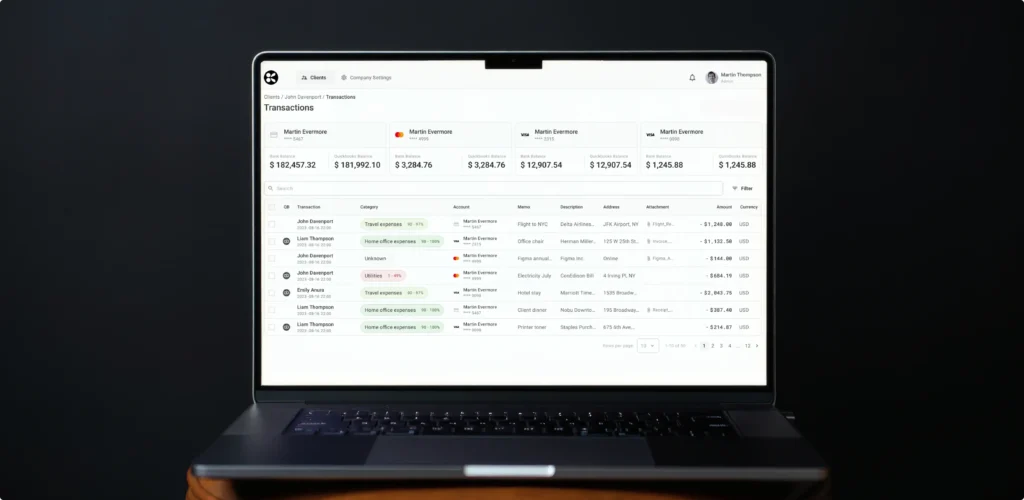
The two groups have fundamentally different workflows. The accountant side needed granular control over categorization rules and approval steps, while the client-facing mobile experience centered on making bank connection simple and secure. Starting from what each person was actually trying to do is what kept these two experiences from getting tangled into one another.
Once the roles and actions are named, they belong in a matrix before anyone opens a design tool. Resources go down the rows: projects, invoices, users, reports, whatever the product manages. Actions and their conditions go across the columns: view, create, edit, delete, export, approve, manage users. Each cell is a yes or no for whether a given role is permitted to perform that action on that resource, and under what condition if one applies.
Here’s a useful way to lay this out for a real feature set:
| Role | Resource | Action | Scope | Exception | Audit requirement |
|---|---|---|---|---|---|
| Admin | Billing | Manage | Account-wide | None | Logged |
| Manager | Projects | Create/edit | Own team only | None | Logged |
| Manager | Time logs | View | Own team only | None | Not logged |
| Member | Tasks | Edit | Assigned tasks only | None | Not logged |
| Member | Project timeline | View | Own project | Cannot edit | Not logged |
This table does two things a wireframe can't. It catches gaps before a single screen is built, the case where nobody thought about where a Manager needs to export a report but the matrix never granted export rights to anyone but Admin. And it gives designers and backend engineers one shared vocabulary. When both sides call the same permission by the same name, the interface and the underlying enforcement stay in sync.


Planning roles and permissions for your SaaS?
UITOP can handle the full permissions setup, from defining the role structure to designing and developing it in the product.
Discuss your productIn a multi-tenant SaaS product, every permission rule stays inside a second, larger rule: nothing from one tenant is visible to another, no matter what role someone holds. Organization membership decides which tenant a user belongs to, and that boundary has to hold even for people whose role would otherwise let them see a lot.
Support access is where this is tested in practice. A support engineer troubleshooting a customer's account needs a path into that tenant's data, but it should be logged, time-limited, and separate from the engineer's own default access. The same goes for anyone who switches between organizations inside the product, a consultant working with several clients, for instance.
The risk worth naming directly is horizontal privilege escalation. This is a user with a legitimate role reaching sideways into another tenant's data, because a check assumed tenant boundaries were already handled elsewhere.
It has little to do with someone trying to grab admin powers they were never granted. Hiding a menu item in the interface doesn't prevent this. If the API underneath still accepts the request, a user who knows the URL or opens developer tools gets the data anyway. Server-side authorization, checked on every request, is the only thing that actually enforces the boundary.
Whoever configures roles inside a SaaS product, usually an account owner or IT admin at the customer's company, is doing work that's genuinely error-prone: deciding who gets access to what, often for people they've never met. The interface for this needs to make good decisions the default and bad ones hard to reach by accident.
Role templates for common cases, Admin, Manager, Viewer, cover the situation most admins are actually in and remove the need to build a role from a blank slate every time. Custom roles still should exist for the accounts that need them, but the permission list inside a custom role has to read like plain language. "Edit client invoices" tells an admin what they're granting. "invoices:write:client_scope" does not.
Dependencies between permissions should surface at the moment they matter. If granting export access implicitly requires view access, the interface needs to say so and offer to add it.
As UITOP's UI/UX Design Team Lead, Katerina Bulkina, put it while reviewing a role-management screen for a client project:

That's the standard worth designing toward: an admin never needs to test a permission in production to find out what it grants.
For a permission-management interface with this much depth to it, the layout work behind designing complex application screens matters as much as the access logic underneath. A technically correct permission model still fails if the screen that manages it confuses the people using it.
Inviting a new person into a SaaS account touches more than a single email. The invite carries who sent it, which organization it belongs to, what role the new person will land with, when the invite expires, and what the system does if the email address already belongs to an account somewhere else. Some products also enforce domain rules, so anyone signing up with a company's email domain lands inside that company's account automatically.
The person receiving the invite deserves to know what they're accepting before they click through. An invite that says "You've been invited to join as a Manager" sets an expectation the product then needs to honor the moment they log in. On the other side, the system needs a plan for invites that stay unopened for weeks: expire them, or make the role assignment revalidate before it takes effect.
Changing someone's role after the fact is where a lot of the actual risk in RBAC is, more than the initial setup. An upgrade from Member to Manager should be a deliberate act with a visible confirmation. A downgrade carries a different kind of risk: the person losing access might have work in progress that depends on the permission being removed, a draft invoice half filled out, a report scheduled to run under their name.
A few situations deserve specific handling. Self-demotion, someone lowering their own access, requires a plain warning about what they're about to lose. Removing the last admin on an account needs to be blocked outright, since it leaves nobody able to manage the account at all.
Active sessions belonging to a user whose role just changed need to pick up the new permissions right away, before they log out and back in on their own. And when an account owner leaves the company, ownership transfer of anything tied to their account, projects, billing, active integrations, should have its own guided flow.
A confirmation dialog that just says "Are you sure?" doesn't give the admin anything to decide with. "This will remove Sarah's access to 6 active projects and cancel her 2 pending approvals" does.
Not every restricted feature deserves the same treatment on screen. A hidden feature disappears entirely, appropriate when someone has no reason to know it exists at all. A disabled feature stays visible but greyed out, appropriate when someone is meant to know the option exists and understand why it's currently unavailable to them, an upgrade prompt, an approval still pending. A blocked action lets someone attempt it and then stops them, which is the right call when the block itself carries useful information, like a duplicate submission being caught mid-flow.
When a permission error does surface, usually a 403 response from the backend, the message on screen needs three things: a plain reason the action was blocked, what the person is actually allowed to do instead, and a path to get help if the restriction seems wrong. What it never includes is any hint at the sensitive data behind the wall, no partial preview of a record someone isn't cleared to see, even in an error message meant to be helpful.
An audit log exists so that a question like "who changed this person's access, and when" has an answer that doesn't depend on anyone's memory. Here are the events worth logging in an RBAC system:
The log itself is only useful if someone is actually able to find what they're looking for in it. Filtering by actor, by time range, and by the resource affected turns a wall of entries into a tool an admin uses to investigate in a few minutes instead of an afternoon.
One point worth stating directly: having an audit log doesn't, on its own, satisfy a compliance requirement. It's one piece of a larger compliance story, and treating it as a checkbox tends to show up the first time someone needs to use it for real.
Everything covered so far about screens, matrices, and role management only holds if the backend actually enforces it. The interface reflects what a user is permitted to do. The backend decides it. These are different jobs.
A handful of habits make the difference here. Give a role the narrowest set of permissions it actually needs, instead of a wide one that's convenient to set up now and trimmed later. So, treat anything without an explicit rule as off-limits by default. Check permissions on every single request throughout a session, since a user's permissions are able to change while they're still logged in, well after the moment they first signed in.
And if a permission check ever fails to run properly, because of a bug or an unexpected error, the system needs to default to blocking the action rather than letting it through.
None of this shows up in a screenshot, which is exactly why it's the part most often shortchanged under deadline pressure. A well-designed role-management screen sitting on top of an API that trusts whatever the client sends is not a secure product, whatever the interface implies. How the architecture underneath handles this is covered in more depth in How architecture decisions affect SaaS permissions and UX, for teams who want the deeper technical picture.
Is your permission system becoming difficult to manage?
We help simplify complex access rules and create clearer admin experiences.
Talk to our team
A permission system that isn't tested the way the rest of the product is tested tends to drift out of sync with what the interface promises. Here's what that testing actually needs to cover:
The last point deserves an actual process. Adding a new resource to a mature SaaS product means someone has to walk it through every existing role and decide, explicitly, who gets access to it. Skipping this step is how products end up with a brand-new feature visible to everyone, admin and viewer alike, simply because nobody added a rule for it.
A handful of mistakes account for most of the RBAC design problems that show up in production SaaS products:
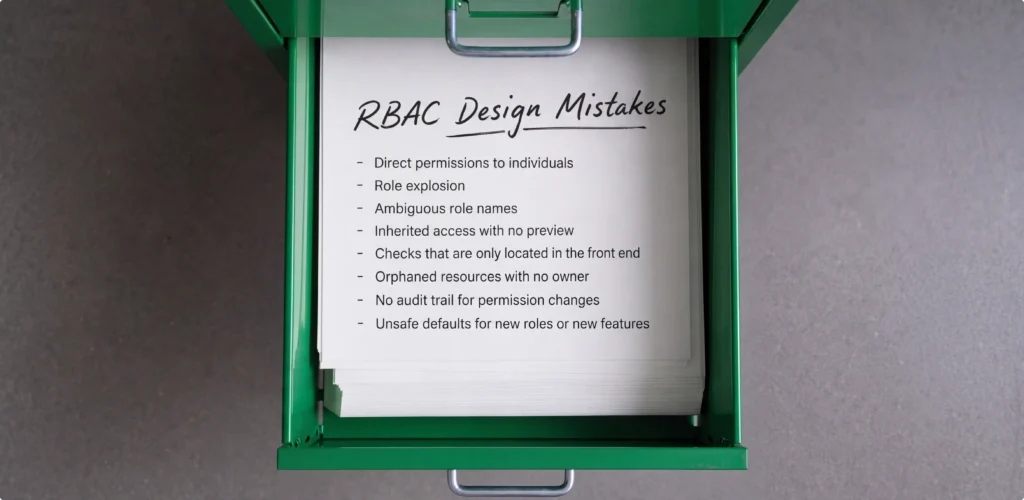
We at UITOP treat permission design as inseparable from the rest of UX-first SaaS product design and development, because most of these mistakes trace back to access control being treated as a backend afterthought instead of a decision made alongside the interface from the start.
RBAC done well is protecting the right resources, reflecting how the business actually organizes its people, and giving the humans using the product a way to understand and manage their own access without guesswork. None of these three goals works without the other two.
A model that's technically airtight but impossible for an admin to configure correctly will get
misconfigured. A model that matches the org chart but leaks data across tenants isn't secure. And a model that's secure and well-organized but never explains itself to the person hitting a permission wall generates a support ticket every time someone runs into it.
The order that actually works starts with the real workflows people follow, continues into a permission matrix that makes every rule explicit, carries that logic into the interface states a user actually sees, gets enforced independently on the backend regardless of what the interface shows, and is tested the same way any other part of the product gets tested.
Skip a step and the other four end up compensating for the gap, usually at the worst possible moment.
If your product's permission model still looks like a few scattered if-statements, or an admin panel nobody fully trusts, we design and build this piece the same way we approach the rest of a SaaS product: starting from real user workflows, working through a permission matrix before any screen is drawn, and making sure the backend enforces exactly what the interface promises Get in touch with UITOP to walk through your current role and permission setup and where it's worth tightening up.
It’s a system for managing who is allowed to view or act on what inside a product by grouping users into roles, each carrying a defined set of permissions, rather than granting access to individual users one at a time.
List every resource in the product as a row, every action and its conditions as a column, and mark which roles get which combination. This exposes missing permissions and gives design and engineering one shared reference before any screen gets built.
A role is a bundle assigned to a type of user, like Manager or Admin. A permission is one specific allowance inside that bundle, like editing an invoice. Roles group permissions; permissions define what’s actually allowed.
It depends on context. Hide a feature someone has no reason to know exists. Disable one they’re meant to be aware of but currently can’t use, with a reason attached. Either way, the backend has to enforce the restriction independently.
Check every role for what it’s allowed to do and what it’s blocked from doing, test across organization boundaries specifically, and rerun those checks whenever a new feature or data type enters the product. Testing only the paths that are supposed to work leaves the actual risk untested.