How we use AI in our process

Product, Development
/
Sep 05, 2026

Logistics software deserves a different design approach because it supports work with a direct effect on deliveries and stock control. The same product often influences staffing decisions and customer commitments as well. A person using the product is usually focused on completing an operational task. There is little reason to explore the interface during this process. So, the software is part of the job itself, so even minor friction often adds time to work, which already depends on several teams.
Therefore, the team developing such software should study how people complete the task and where the product may experience delay. The software should then be designed to reduce this effort and limit avoidable mistakes.
In this article, we look at the workflows and user roles behind logistics products. We also cover real-time data and mobile use, architecture and product discovery, and much more.
The first reason to treat your logistics software solution differently is the number of roles involved in one operation. A shipment often begins in an office system and later passes into a warehouse workflow. The final delivery record is often completed in a driver application.
This difference affects the interface. One shared dashboard with hidden menu items frequently leaves a driver with planning data or a warehouse employee with fields meant for customer service. The product is more useful when it presents the part of the operation linked to the user’s current task.
Data timing deserves consideration, too. Vehicle locations change throughout the day, while order details are revised by different teams. Stock records may pass through several systems as well. So, users need to know which value is current and whether another update is still processing. When the product shows only the latest visible state, a person might assume the update has reached every connected system.
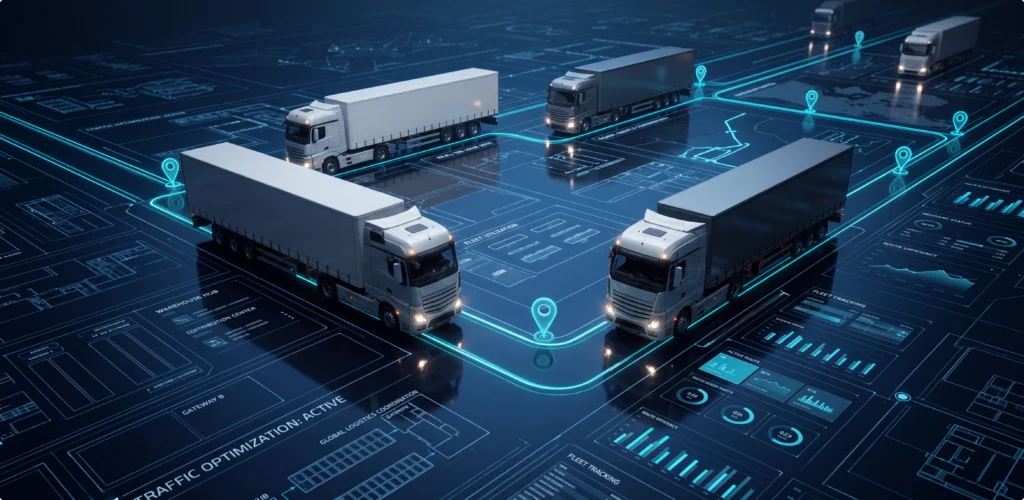
An incorrect delivery status might affect customer messaging and billing, while a wrong quantity could influence replenishment or order availability. The interface works better when it limits this error before the record reaches the next team.
Traditional SaaS usability principles still apply, but logistics software usually needs a tighter link between interface design and operational rules. System behavior has to follow the same process.
The table below summarizes the main areas where logistics software usually requires a different approach from traditional SaaS:
| Area | Traditional SaaS | Logistics software |
|---|---|---|
| Users | Can support several roles, often within a shared office-based workflow | Often connects people working across dispatch, warehousing, transport, customer service, and management |
| Work environment | Commonly used in settings where users have regular access to a computer and stable connectivity | May be used across offices, warehouses, vehicles, yards, and delivery locations |
| Data updates | Data can change frequently, depending on the product | Route progress, stock levels, vehicle locations, and delivery statuses often change throughout the operating day |
| Decision speed | Some tasks allow users more time to review information before acting | Many operational decisions need to be made while deliveries and warehouse work are still in progress |
| Interface needs | Shared layouts can work when roles follow similar workflows | Roles often require different information priorities, actions, and levels of detail |
Before the team begins discussing screens, it needs to understand how the logistics operation works. Interface decisions depend on the order in which goods, information, and responsibilities pass between teams.
Process analysis should cover the main stages of the operation:
Each stage affects the next one. A dispatcher, for example, needs accurate loading information before releasing a vehicle. Route planning depends on current order details, driver availability, and delivery windows. Once the vehicle leaves, tracking data helps the team decide whether the route still follows the plan or needs attention.
Studying these connections helps the product team decide what users need to see at each point. It also shows which actions belong together and which tasks depend on confirmation from another role or system.
Importantly, research should include conversations with the people who complete these tasks. Process documents describe the planned operation, but employees may be able to explain where they wait for an update or enter the same data twice. These details can point to missing information or unnecessary steps in the current product.
Thus, process analysis gives designers and developers the context needed before they define the interface. The resulting screens are more likely to support the actual operation and pass accurate information from one stage to the next.


Explore our logistics software development services
Discover how we build logistics platforms that simplify operations, reduce manual work, and support real-time decision-making.
Learn moreWorkflow research usually reveals another design issue. One product often supports several roles whose working views must differ:
Role-based design should cover:
Role-based design leads naturally to error prevention because each role faces a different type of risk. In a warehouse, one incorrect scan can connect an item to the wrong order. The employee then has to stop the task and establish where the item belongs before the record reaches loading.
A set of controls should include:
Error wording matters. “Scanned item belongs to order 4821” gives the user a reason and a next step, while “Invalid input” does neither.
Confirmations need the same level of detail. When a shipment has two unconfirmed items, the closing step needs to name them and explain the result of closing the record.
Input limits work best when they still allow legitimate exceptions. An entered quantity above the expected amount might be valid after a supplier change. The system could request a reason and mark the record for review. This keeps the exception documented while the employee continues the job.
Correction also requires a designed path. Users need to know whether a saved action is editable or reversible. If approval is necessary, the interface needs to show who receives the request. An audit history then shows which value is current and why it changed.
Error prevention is only one part of the work. The team also should examine speed. In logistics, speed includes understanding an issue and verifying the result of the next action.
A dispatcher dealing with a vehicle problem might need to see the affected stops beside their delivery windows. Nearby capacity becomes relevant once the impact is understood. If these details are in separate views, the person spends time making the decision manually.
Bringing this information into one working area often shortens the task without removing useful context.
System feedback has an equal role. After a user updates a route, the interface must display whether the change is saved or still processing. A separate state is useful when another service has not confirmed it yet. This helps the person decide whether work is ready to continue.
Batch actions reduce repetitive work, though they need a review step that shows the affected records. If a few records do not meet the rule, the product is more useful when it identifies them and explains why they were excluded.
Faster decisions often depend on current information, which is why tracking and live status updates receive so much attention in logistics projects. The amount of data becomes difficult when the interface gives routine updates the same weight as changes that require action.
A vehicle often sends location updates throughout the route. Dispatch does not need an alert each time the vehicle continues as planned. A revised arrival estimate which affects the next delivery window has more operational value.
The interface is easier to use when routine movement is separated from exceptions. It also must reflect the quality of the data.
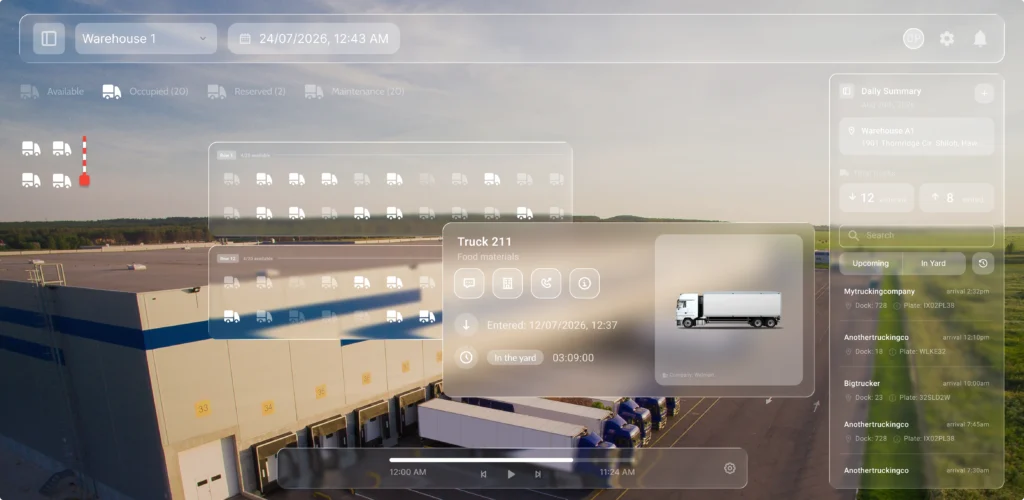
A convenient real-time view usually should:
Maps need the same discipline. A dispatcher reviewing a delayed pickup often needs nearby vehicles and route impact. The full fleet view remains available, but the task-specific view needs priority.
Notifications also need ownership. An alert is effective only when it reaches a person able to act on it. The product also needs to show whether someone has accepted the issue. This reduces duplicate work and gives the team one view of the current response.
Drivers and field teams complete much of their work away from a desk, so the mobile product needs its own design approach. A smaller version of the desktop interface is usually not enough. The app has to support short tasks while the user is travelling or working at a delivery point.
Logistics app development should focus on the actions people require most often. This may include:
Each task should require as few interactions as possible, since users often open the app for only a short time.
In addition, the interface should work well on a small screen. Important details should be easy to find, buttons need enough space for touch, and forms should ask only for information required at this stage. Data already stored in the system should appear automatically where possible.
Furthermore, poor connectivity is part of fieldwork, so the app should not depend on a stable network for every action. Drivers may need access to assigned routes and delivery details when the signal is weak. They may also need to record a status or capture proof while offline.
In these cases, the app should save the update on the device and send it once the connection returns. The user must be able to see whether the information is stored locally, waiting to sync, or already received by the main system.
Mobile testing should also reflect the devices used in daily operations. Screen size, camera quality, battery use, and scanner support may affect how the app performs. Designing for these conditions helps field teams complete their work with fewer delays and less repeated input.
Mobile work and real-time data lead directly to architecture because the interface depends on how systems exchange information. A well-structured screen cannot fix delayed updates or conflicting records by itself.
A driver assignment often passes through several services. The frontend records the action before the transport system updates the shipment. The driver app receives the route after this update is available. A customer notification service might also revise the estimated delivery time. These updates do not always complete at the same moment.
The interface, therefore, must represent this intermediate state. Dispatch might first see “assignment processing,” followed by “driver confirmed.” If one service fails, the product needs to identify the affected update and the available next action.
Performance planning is more reliable when it uses realistic data volumes. A dashboard might work well with test records and slow down once thousands of active orders are loaded. The frontend needs useful filters and controlled loading. Backend queries must support the way users inspect operations during a shift.
Audit history supports this process. When a route or quantity looks incorrect, users often need to see which system supplied the value and when it changed.
Architecture affects the experience directly, so UX and logistics software development work better when they progress together. If design work advances too far before technical review, the team could approve a workflow that depends on data arriving faster than the system provides it.
A dispatcher dashboard grouped by urgency is a useful example. The product team needs to define how urgency is calculated and how often it updates. The data sources behind this result also call for review. These questions affect interface design and backend logic. They also influence integration work and performance.
Offline mobile work creates the same need for collaboration. Designers must know which records remain available on the device and which actions require server confirmation. Developers need to understand what the driver sees while the app is waiting to synchronize.
At UITOP, we work as a full-service UX/UI and software development agency. This helps connect workflow research with interface decisions. Frontend implementation and backend logic remain part of the same product discussion. Integration planning belongs there as well. Our designers review technical limits while the product is still being planned, and developers receive the operational context behind each feature.
In addition, our agency has extensive experience in the logistics industry and has already delivered strong results for multiple clients.
For instance, one of our clients, LogiCore, previously relied on several separate tools to manage warehouse operations, inventory, shipments, and trucks in transit. Information did not always pass between these systems on time, so warehouse employees and office managers had to enter data manually or work with incomplete updates.
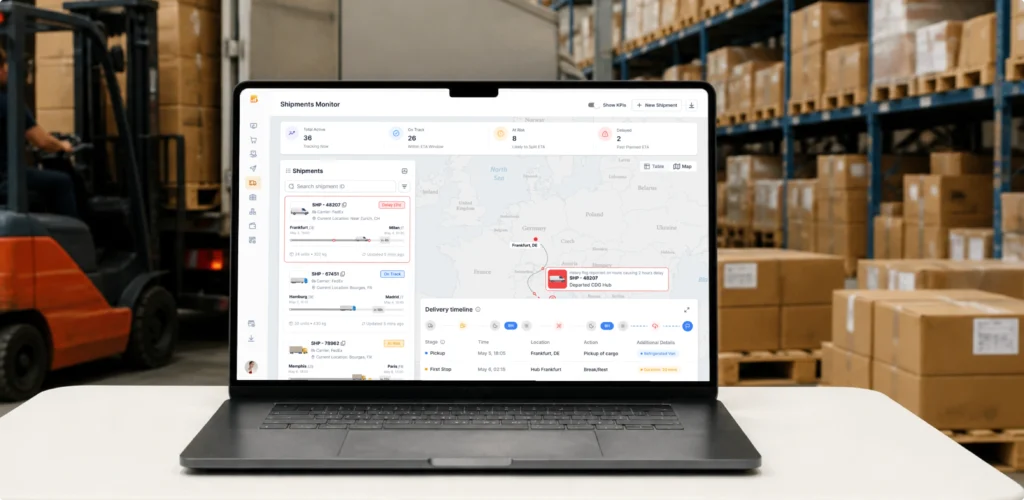
We created a custom logistics SaaS that brought these operations into one platform. During the eight-month project, our design, project management, development, and QA teams worked on shipment tracking, warehouse maps, SKU and inventory management, operational dashboards, and live freight updates. Warehouse teams, office staff, and transport operations now work with the same real-time data. The platform achieved 100% stability during peak-load testing and helped teams make daily shipping decisions twice as fast.
When UX and development work from the same operational model, the team is in a better position to deal with a common supply chain problem: the system contains more detail than any one user needs during a task.
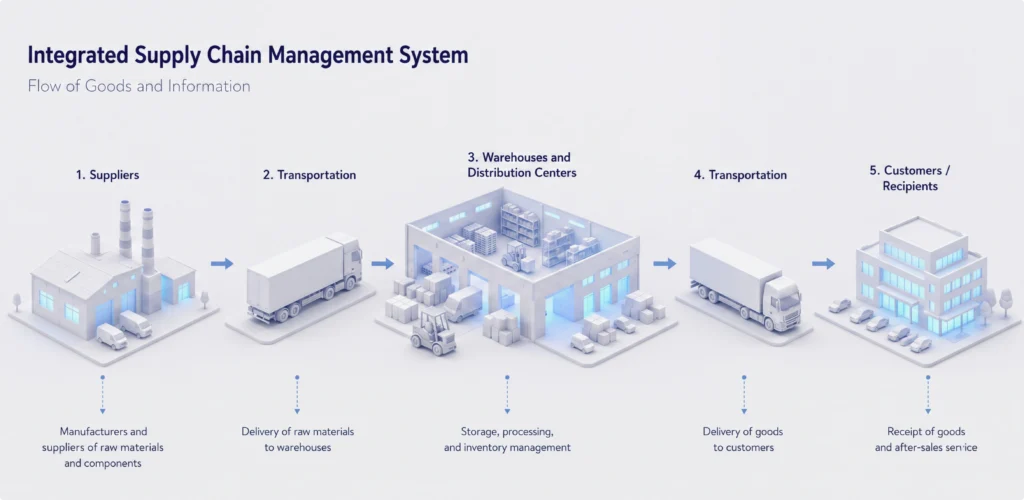
Supply chain software often connects purchasing with warehouse operations and transport. Returns and billing add further dependencies. Each area creates data which another team often uses later. The working interface is more useful when it focuses on the responsibility of the person using it.
During goods receipt, the warehouse employee requires the expected quantity beside the product code. Inspection rules and storage location become relevant as the task continues. Supplier history remains available when a discrepancy needs investigation.
Progressive disclosure helps with this structure. The main view presents the current task. More detail appears when the user opens an exception or checks a source document. The full shipment history remains available for deeper review.
Logistics software development services also should account for what follows each user action. A driver chooses a reason when a delivery cannot be completed. This value often affects dispatch planning and the next delivery attempt. It might also influence customer communication or billing rules.
The mobile interaction needs to stay brief, while the data model supports these later processes. The user does not need to understand every dependency behind the choice.
Simple workflows usually come from careful decisions about responsibility and data timing. Exception handling needs the same level of attention. The underlying supply chain remains detailed. The interface gives each person the part needed for the current job.
Once the core workflows support current operations, growth brings another set of design decisions. A logistics platform built for one warehouse and a small fleet often needs a different structure as the business adds locations. New partners and larger data volumes create further pressure on this structure.
Technical scale is only part of this work. A dashboard designed for 20 active deliveries might become difficult to scan at two thousand, while a location selector built for three warehouses could become slow as the network expands.
The information model should support hierarchy. Users might need to view operations by region or facility. Team views could be required later. Service type and customer views often appear as the operation grows.
Permissions usually become more detailed as well. A local manager might access one site, while a regional lead reviews several. External partners may see only selected shipments. The permission model needs to support these relationships.
Higher volume often creates a need for saved filters and search. Bulk actions become useful when users repeat the same update across many records. Useful defaults still matter because employees do not need to rebuild the same view each shift.
Integrations tend to increase with growth. New carriers and warehouse systems introduce more update states. Customer portals add another source of data exchange. Consistent wording for pending and confirmed data helps users understand what the platform knows. Delayed or failed updates need separate treatment.
A UX-first approach is most useful when it examines how interaction effort changes with scale. More shipments will increase operational volume, but manual work in the interface does not need to rise at the same rate.
Scaling decisions are easier when the team understands the current operation, and this understanding belongs before a major design commitment. This is the role of the product discovery process.
A logistics project often starts with a request for a dashboard or driver app. A warehouse tool or customer portal might be discussed at the same stage. The request describes a possible output, though it does not always explain the source of the operational issue.
Discovery gives the team time to study the work through interviews and observation. Technical review and early prototypes add evidence before implementation. Written procedures explain the intended process. Daily work often includes spreadsheets or calls that fill gaps in the current product. Notes sometimes carry details the software does not capture.
These workarounds deserve attention because they may add delay or preserve useful operational knowledge.
A company might request a larger tracking map because deliveries are late. Research could show dispatch already has enough location data, while order changes reach the team too late. Building the map would not address the source of the delay.
Early prototypes let users complete realistic tasks before full implementation. The team sees missing information and confusing labels. It also notices actions placed at the wrong point in the flow. Watching the task often provides more value than asking whether the screen looks good.
Technical discovery works best in parallel with user research. The team needs to review existing systems and integration options. Data quality and device limits deserve separate attention, along with security and performance expectations.
This work reduces assumptions in logistics software development. Scope and priorities become easier to define, and architecture decisions use the same evidence.
Improve your logistics operations with better software
Need a UX-first team that can turn complex logistics workflows into intuitive digital products?
Book a callLogistics management software is usually created to support a business process. It tracks shipments, records inventory updates, manages routes, and passes information between teams. This structure is necessary, but the product also must support the people who complete each task.
A process diagram can show when an order is received, packed, dispatched, and delivered. It does not show how much information a warehouse employee can review while scanning goods or how quickly a dispatcher needs to respond to a delay. These working conditions should influence the interface.
The product should present each user with the information needed for the current task. Designing around users also means reducing work created by the software itself. Employees should not have to enter the same data in several places or call another team to confirm whether an update was received. When these steps appear regularly, the product team should examine whether the interface, integration, or status logic needs improvement.
The system still has to follow business rules. Inventory changes need to be recorded correctly, and shipment stages need to follow the agreed process. The interface should apply these rules in a way which fits the user’s task. This could mean limiting an input or placing related information on the same screen.
Thus, a design and development agency working on logistics products should study both the process and the people using the product. This includes understanding where the work takes place, which devices are used, and how much time users have for each action. These details help the team design software that supports the operation in daily use.
The reason to invest in UX is operational. A useful logistics platform helps users understand the current state and complete tasks with less delay. It also needs to support accurate data entry and recovery from exceptions.
UX-first development gives the team a way to review any issues before they become expensive changes. It also gives designers and developers one working model for the product. Operational stakeholders review the same model.
If your logistics product creates repeated manual work or slows routine tasks, our UITOP agency can assist. The same applies when the product no longer matches current operations. Our team provides product discovery and UX/UI design. We also deliver end-to-end logistics software development services. Contact us to discuss how your logistics platform could better support the people who use it each day!
A useful logistics product should match the way operations are managed. Each role needs access to relevant data, while routine actions should take little time. Performance and integrations are also essential, since a delayed update could affect warehouse work or customer communication.
By placing instructions in the order of the task, UX can reduce the time spent searching through screens or correcting entries. Direct scan feedback and sensible input limits also help employees complete receiving, picking, and stock updates with fewer interruptions.
Real-time tracking matters because dispatch decisions often depend on current route progress. When a delay appears, the team could review its effect on later stops while there is still time to adjust the plan. The interface also should show when the latest update was received.
Operational errors are easier to prevent when the system checks entries before saving them. Input limits, direct warnings, and selective confirmations help users correct a record while the task is still in front of them, before inaccurate data reaches another team.
Development usually benefits from early research into workflows, user roles, devices, and integrations. Connectivity limits and expected data volumes also need attention before the interface is finalized, since both could affect how quickly users receive updates and complete daily tasks.