How we use AI in our process

Design, Product
/
Oct 15, 2026

You’ve built a working prototype with AI. The main idea makes sense, the screens look good, and the core features seem to work. That’s real progress. You’ve already turned an idea into something people can try.
The next step takes more work. Real users bring real data, payments, permissions, and unexpected behavior. Your app needs to handle all of them reliably. A demo can look great while hiding problems with the backend, security, or business logic. These issues become harder to ignore as the product grows.
The good news? You don’t have to throw everything away and start from scratch. You need to understand what you’ve built, what works well, and what needs attention.
We tested this in our team's recent experiment with AI-built interfaces. We started with product research, built a design system, and then tested how well AI could follow our custom design rules. It showed how much easier it is to get useful results when AI has the right context to work with. The same goes for production-ready software: AI can speed things up, but good results still depend on clear product decisions, solid architecture, and proper engineering.
In this guide, we’ll look at what it takes to move from a promising prototype to a product people can actually rely on. You’ll learn how to spot weak points early and make sure your app is ready to grow without losing what made the original idea work.
A prototype shows that your idea can work, but a production product needs to handle real-world use. Vibe coding helps founders test ideas quickly, but problems can arise when AI-generated code goes live without enough testing, security checks, or clear ownership.
So, here’s what usually separates a working prototype from a product you can rely on.
| Area | Prototype ready | Production ready |
|---|---|---|
| Users and data | Test accounts and sample data | Real users, real data, and safe data handling |
| Failure impact | A broken feature means restarting the demo | A failure can interrupt work, lose data, or cost money |
| Security | Basic access checks, often tested manually | Proper permissions, protected secrets, and secure data flows |
| Maintainability | The code works, but changes can break other parts | Clear code structure and reusable components the team can work with |
| Observability | You notice errors when someone reports them | Logs, monitoring, and alerts help catch problems early |
| Deployment | Runs locally or in a simple preview | Reliable releases, tested environments, and a way to roll back changes |
| Support | The creator fixes problems as they come up | Someone is responsible for incidents, bug fixes, and user support |
| Compliance | Requirements haven’t been fully checked | Relevant privacy, security, and compliance requirements are covered |
You don't need to make every early product enterprise-grade. It can stay simple, as long as you understand the risks before they affect customers.

So,if you're turning an MVP into scalable software, start by checking how it handles real users, real data, and things going wrong. A demo shows that your idea works. A production-ready product needs to keep working when people depend on it.

Get the app ready for launch
Make sure your product can handle real users and protect their data.
Contact usBefore turning an AI-built prototype into a real product, take a closer look at what you already have. The screens might look great, and the main flow might work in a demo. But you still need to understand how the product works and what needs to be done before real users can use it.
Start with the repository, code ownership, environments, and dependencies. Check where secrets are stored, how APIs connect, how the database is structured, and how authentication and payments work. Review third-party vendors, deployment processes, and any technical limitations that could affect future development. This gives you a clearer picture of what you can keep, what needs fixing, and what might cause trouble later.
The product side matters just as much. Go back to the research behind the prototype and check whether the main workflows reflect real user needs. For example, imagine you're building a spend management tool for finance teams. A finance manager needs to review an expense, spot missing information, request a cost center, and track the response. Each step should work as part of one connected flow, with the right status changes, notifications, and activity history.
This is also a good time to check how AI handled your product logic.
These details matter because a polished UI doesn't guarantee that the product supports the right decisions.
If you've built the prototype in Claude or another AI tool, review the generated code and component structure before adding more features. Check whether the design system is consistent, components are reusable, and custom UI patterns can be maintained as the product grows.

A structured technical discovery before production helps connect these findings with a practical development plan. You'll know which parts are ready to build on, which need more work, and what risks to address first. The idea is to understand what you have before investing more time and money in it, instead of rebuilding everything from scratch.
Once you've reviewed the prototype, it's time to decide what to do with it. Some parts might be ready to use, others may need some work, and a few might be better off replaced. There's no need to treat the whole product the same way.
To make these decisions, look at a few things:
These factors help you choose the right next step. Keep parts that already work well. Refactor code that's useful but hard to maintain. Replace components that create unnecessary risks or depend on tools you don't want to rely on. Rebuild only when the current solution makes further development too difficult or expensive.
For example, if AI helped you build a useful expense review flow, you don't need to throw it away just because the code needs work. You've already figured out how users review expenses and what information they need. Keep that knowledge and improve the code behind it.
Starting from scratch might seem easier when the code gets messy. But you'd also have to rebuild parts that already work. Look at what actually needs fixing and make changes where they matter.
An AI-generated prototype can look and feel like a real product. But once people start using it with real data, things get more complicated. The backend needs to handle the rules and processes that keep everything working.
Start by checking the business logic. What happens when a user takes a particular action? Which rules apply, and where are they handled? Then look at how the APIs connect different parts of the system, how the database is structured, and who owns each piece of data.
There are a few other things worth checking:
These details might not seem urgent when you're building a prototype. But they matter a lot once people depend on the product for everyday work.
Take Pacioli, a financial platform UITOP designed and built from scratch to replace disconnected spreadsheets and outdated tools. It needed to pull transactions from Canadian banks, process CSV uploads, clean up inconsistent data, and categorize healthcare expenses.
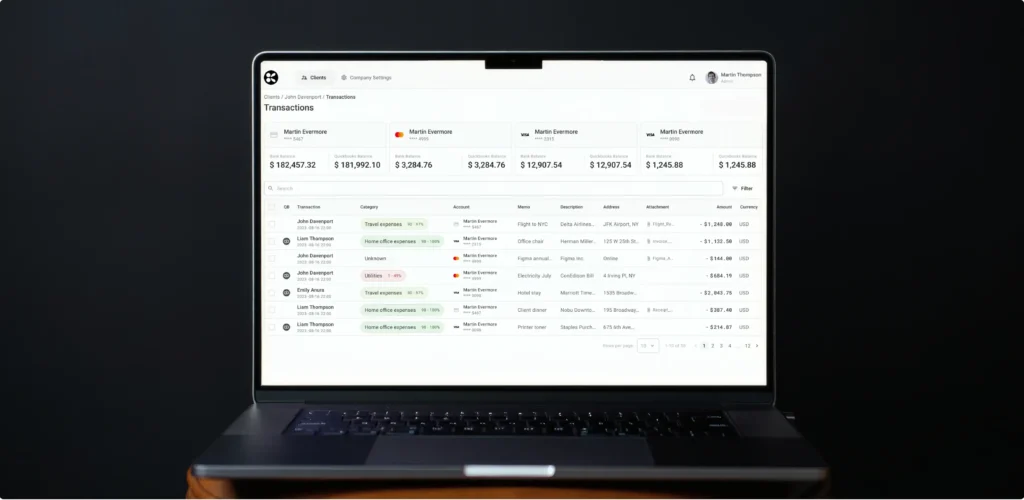
We built a data pipeline that applies the same logic to transactions from both live bank feeds and CSV files. We also added a custom rule engine that lets accountants override AI suggestions when needed.
This means transactions get consistent treatment regardless of where they come from. Pacioli now achieves 100% consistency in categorization logic across live feeds and offline files, with 97% direct transaction coverage across Canadian financial institutions.
Before moving forward, make sure you have three things documented: an architecture map showing how the different parts connect, a schema review covering the database structure and data ownership, and a migration plan for making changes without breaking existing features. With these in place, your team can build on the prototype without carrying its technical problems into every new feature.
A login screen can look perfectly fine and still leave some serious security gaps. Before releasing your product, check how it handles user accounts, login sessions, and access to sensitive information. Getting these parts right matters even more when your app stores personal, financial, or business data.
Start by looking at four parts:
It's easy to mix these up when building a prototype, but each part needs to work properly. Signing in successfully shouldn't give someone access to everything.
Check what happens when users forget their passwords, too. Can they recover their accounts safely? Does multi-factor authentication (MFA) work? Do sessions expire at the right time, and can users revoke access when needed?
Then look at how the app handles permissions. Access rules should be checked on the server, not just in the interface. Hiding an admin button won't stop someone from calling the same API directly. Make sure users can access only the data and actions their roles allow. If your app serves multiple companies, one company's users must never see another company's information. It's also worth setting limits on repeated login attempts and password recovery requests to make abuse harder.
Finally, test what happens when things go wrong. Try signing in with the wrong password, using an expired session, requesting another user's data, or accessing a feature without permission. These negative tests should confirm that the app blocks unauthorized requests instead of exposing sensitive information. You can also use authentication and access-control verification to check that your app handles logins and user permissions safely.
Before launch, make sure your team can show that these checks pass. Good security means users can get to what they need, and their data stays safe.
A payment might work perfectly during a demo, but what happens when a customer clicks Pay twice or a request fails halfway through? These are the kinds of situations you need to account for before launch.
Start with how you handle card details. Use hosted payment fields from your payment provider so sensitive information goes straight to them. Your app shouldn't store raw card numbers or security codes. Payment amounts should also be calculated on the server, rather than taken from the browser, where users could change them.
Next, check how your app handles webhooks. These messages tell your system when payments succeed or fail and when subscriptions change. Verify each webhook's signature to confirm it came from your payment provider. Since the same event can arrive more than once, use idempotency to prevent duplicate charges and repeated updates. If processing fails, retries should let the system try again without creating duplicate transactions.
Subscriptions need attention, too. Make sure the app handles active, past-due, canceled, and expired subscriptions correctly. If a payment fails, access should change according to your rules. Customers should also be able to cancel or restart a subscription without leaving their accounts in the wrong state.
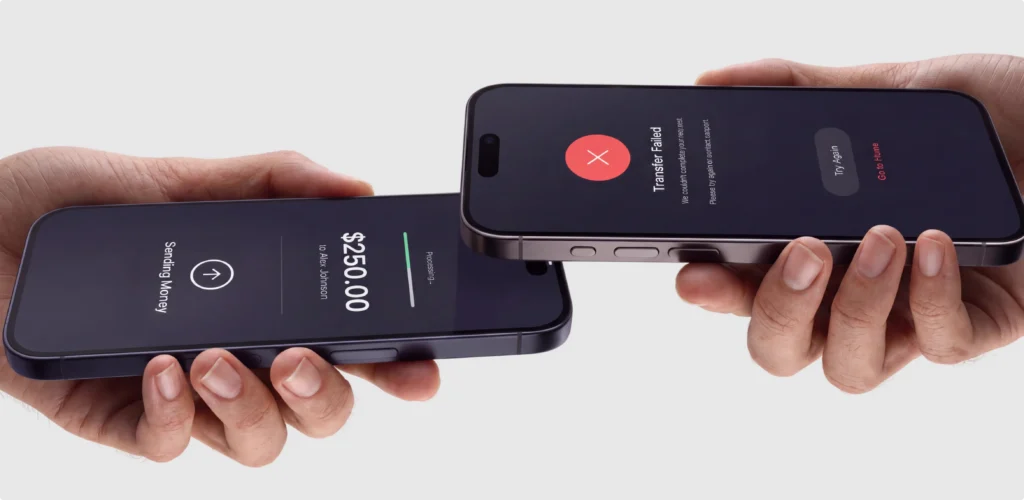
The same goes for refunds. Check that they're processed correctly and reflected in both your payment records and customer accounts.
Finally, keep test and live payment environments separate. Use test credentials during development, and make sure test transactions never trigger real charges.
Before launch, try successful and declined payments, duplicate requests, delayed webhooks, failed retries, subscription changes, and refunds. Check that each scenario leaves the payment records and customer account in the right state.
It's worth spending time on these details before real customers start paying. Fixing a duplicate charge or a subscription that shows the wrong status is much harder once people are already using your product.
When AI writes your code, it can leave behind things you don't want in a production app, like API keys, test credentials, or packages you don't actually need. Before launch, take a look at what's in your codebase and what your app depends on.
Start with hardcoded keys and passwords. Search the codebase, check the files sent to the browser, and review environment variables. Anything included in a client-side bundle can be seen by users, even if it's hidden in the code. Check Git history, too. Removing a key from the latest version won't help if it still exists in an earlier commit.
If you find exposed credentials, don't just delete them. Rotate the keys, revoke anything you no longer need, and remove the old values from the code. Store active secrets in environment variables or a dedicated secrets manager, with access limited to the services and people that need them.
It's also worth checking your third-party dependencies. AI tools can add packages that seem useful but bring security issues, unnecessary code, or license restrictions. Review which packages your product actually uses, check for known vulnerabilities, and make sure their licenses fit your project. Pay attention to outdated packages and libraries that are no longer maintained.
Check your CORS settings as well. They should allow requests only from the origins your app needs, rather than opening access to any website by default.
Once you've fixed the immediate issues, keep monitoring dependencies for new vulnerabilities and update packages when needed. Set up alerts so your team doesn't have to discover problems by chance. A practical order is to rotate exposed keys, revoke unused credentials, remove secrets from the codebase, patch vulnerable dependencies, and monitor for new issues.
These checks don't take away every risk, but they help prevent avoidable problems before your product starts handling real customer data.
Once the main features are in place, it’s worth looking at how the interface holds together. AI-generated screens can look polished on their own, yet small inconsistencies tend to show up as the product grows. You might find three versions of the same button, missing error states, different icon styles, or navigation that works on desktop but feels awkward on mobile.
These details affect how people use the product and how much effort your team spends maintaining it.
Accessibility, responsive behavior, and consistent component states all deserve attention before the UI becomes harder to change.
A shared design system makes these fixes easier to manage. Design tokens keep colors, fonts, and spacing consistent across screens. Reusable components do the same for buttons, forms, menus, and other common elements. When something needs to change, your team can update the shared component instead of fixing the same issue in several places.
Tools like Figma MCP, Claude, and Lovable can speed up design and development, but they can’t guarantee a good result on their own. The generated UI still needs to be checked for duplicate components, missing states, accessibility issues, and responsive behavior. Good UX design for AI products also means making sure the interface feels clear and works well for the people using it.
CustomerSure is a good example. The platform helps companies collect customer feedback and use it to improve their services. It already had a Bootstrap-based product and design system, but over time, the designs in Figma had drifted away from the live interface. Some components were duplicated, certain states were missing, and icons and navigation patterns weren’t always consistent.
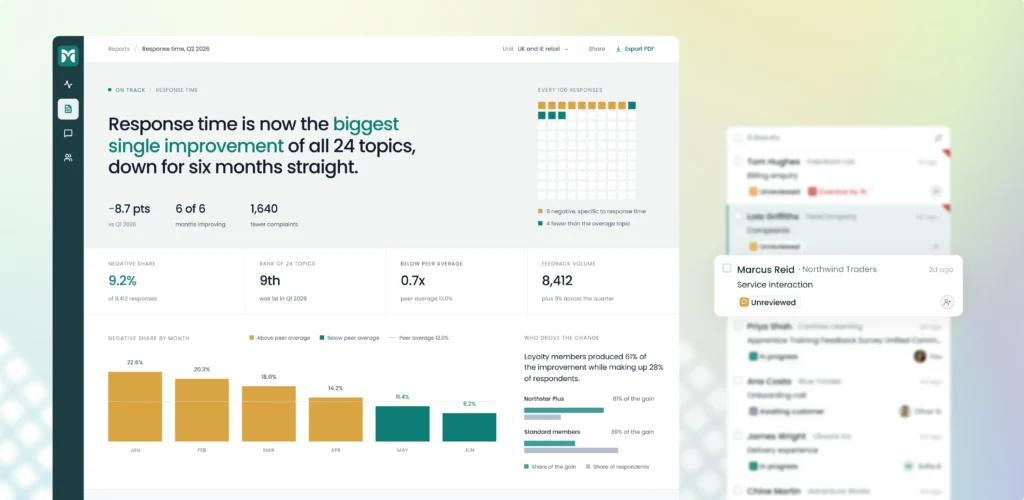
UITOP aligned Figma with the existing code, cleaned up repeated components, and improved accessibility and readability. We also adjusted content widths so users could scan large amounts of feedback more easily. And because this work happened alongside ongoing product updates, the team could improve the design system without putting the rest of the product on hold. The result was a more consistent UI that’s easier to update, build on, and maintain as CustomerSure grows.
Keep the UX consistent
AI-generated interfaces need a unified design system and clean component structure to stay maintainable as products grow
Contact usGetting a prototype to work in a demo doesn't tell you how it will behave once people start using it every day. A user might sign up, reset a password, make a payment, or try to access a file shared by someone else. Each of these actions needs to work as expected, even when something goes wrong.
Different tests help you catch different issues.
| Test type | What it checks |
|---|---|
| Unit tests | Individual functions and business rules |
| Integration tests | Communication between services and databases |
| End-to-end tests | Complete user journeys across the application |
| Security tests | Unauthorized access, injection, and other vulnerabilities |
| Accessibility tests | Keyboard navigation, labels, and interface usability |
| Performance tests | Response times and behavior under load |
| Regression tests | Whether new changes break existing features |
Start with the parts that could cause the biggest problems. Identity, payments, and access to other users' data should be high on your list. Try logging in with incorrect details, using an expired session, submitting the same payment twice, or opening another user's records. Check what happens when requests fail or users enter unexpected information. These cases are easy to miss when you only test the happy path.
The data you use for testing matters, too. Set up realistic scenarios with different user roles, permissions, payment statuses, and error cases. Include empty states and incomplete forms, not just examples where everything works perfectly. Use test data instead of real customer information wherever possible, and make sure you can reset it and run the same tests again.
Pay attention to your staging environment as well. It should be as close to production as practical, including configuration, database setup, and third-party services. Otherwise, something that worked during testing might break after release.
You don't have to test every little detail before launch. Start with the journeys people depend on most, automate repeatable checks where you can, and add more coverage as the product grows. This gives you a much better chance of catching serious issues before your users run into them.
A prototype can feel fast when only one person is using it and there’s barely any data to process. Things can change quickly once more users sign in, upload files, run reports, or send requests at the same time. Before launch, you need to understand how your app behaves under the kind of workload it’s likely to face.
Start by setting realistic scenarios. Estimate how many people might use the app at once, how much data they’ll work with, and which actions put the most pressure on the system. Then test those scenarios and watch where things slow down.
Database queries are a good place to look. Some may work fine with a small dataset but become painfully slow as records pile up. Caching can reduce repeated work, while queues help process background tasks without making users wait for every step. Check how the app handles simultaneous requests, large file uploads, and limits on file size or API usage. If your product relies on AI services or paid APIs, track the cost per request and estimate how spending could change as usage grows.
You also need a plan for when something fails. Set timeouts so requests don't hang forever, and use retries for temporary issues. Make sure retries won't create duplicate payments or records. If an operation fails halfway through, decide whether the system should roll it back or safely resume it. For longer tasks, let users know what's happening instead of leaving them staring at a spinner with no explanation.
Some features may also need to keep working when a service is unavailable. For example, your app could show the latest saved data while a report is being generated, or let users continue with core features if an AI service is temporarily down. Clear error messages should explain what happened and what users can do next.
These checks help you find bottlenecks before they affect customers and avoid surprises as usage grows. Good production-ready web app development includes planning for slowdowns, service failures, and rising costs, not just making everything work when conditions are ideal.
Getting your app ready for launch means knowing how to run it once real users arrive. You need a clear path from development to staging and production. Each environment should have the right settings, credentials, and access rules. This helps prevent test data, debug settings, or unfinished features from reaching customers.
Set up a CI/CD pipeline to automate builds, tests, and deployments. Keep code reviews and automated checks in place before changes reach production. Use feature flags to release new functionality gradually. If something goes wrong, you can switch off the affected feature without taking down the whole app. Make sure your team also knows how to roll back a release.
Once the app is live, logs and metrics help you spot problems before users report them. Start with a dashboard that tracks:
Set alerts for unusual error spikes, slow responses, failed background jobs, and low storage space. Logs should help your team trace issues without exposing passwords, payment details, or other sensitive data.
Backups need regular attention, too. Automate them, define how much data you can afford to lose, and decide how quickly the service must recover. Most importantly, test restoring a backup. A successful backup job doesn't prove you can recover your product when you need to.
Finally, prepare for incidents before one happens. Document rollback steps, list the people responsible for handling problems, and keep incident contacts easy to find. Make sure someone knows what to do if a deployment breaks payments or a database becomes unavailable.
These steps give your team a practical way to monitor, recover, and improve the product after launch. They're an important part of turning a prototype into software you can confidently run and maintain.

Before your app goes live, take a close look at the data it collects and how it handles it. An AI-built prototype might store more information than your product actually needs. It may also send data to third-party services without making those flows obvious.
Start by answering a few basic questions:
These details matter when you handle personal information, financial records, or customer documents. Your privacy policy should reflect what the app actually does, not what you plan to build later. Make sure users understand what happens to their data, especially when AI features or external APIs are involved.
Compliance needs the same practical approach. SOC 2 isn't a checkbox you tick before launch. It requires evidence that your security controls work and that your team follows them consistently. That means documenting processes, managing access, and keeping records of important security activities.
For secure software development practices, the NIST Secure Software Development Framework offers useful guidance throughout the development lifecycle. It can help your team build security checks into everyday work instead of treating them as a final review.
If your product handles healthcare data, financial information, or other regulated records, get a specialist to review your setup. Requirements depend on your industry, customers, and where data is processed. Sorting these questions out early can save costly changes later.
Once you've reviewed your app, you'll probably have a long list of things to fix. Trying to deal with everything at once can slow you down. Instead, sort the issues by risk and decide what needs attention before launch.
Start by sorting your findings into phases:
A simple table can help you turn audit findings into specific tasks:
| Risk | Evidence | Action | Owner | Exit criterion |
|---|---|---|---|---|
| Users can access other accounts | Authorization test fails | Fix permissions and add tests | Backend developer | Cross-account access tests pass |
| Payments can be duplicated | Repeated requests create charges | Add idempotency checks | Payments engineer | Duplicate requests create one charge |
| App slows down with larger datasets | Load tests show slow queries | Optimize queries and add caching | Tech lead | Response times meet agreed targets |
Give every issue an owner and a clear condition for completion. "Improve security" is too vague to track. "Block unauthorized requests and pass the access tests" gives the team something concrete to work toward.
Your priorities will depend on the product. A simple internal tool has different risks from a financial app handling sensitive customer data. Team size, integrations, and launch requirements also affect the amount of work involved. And if you're still shaping the product, building an MVP that can scale may help you make better technical decisions early.
There's no fixed timeline that works for every project. Deal with critical risks first, then move forward as each phase is ready. Keep the remaining improvements on your backlog, even after launch, so they don't get lost in the rush of new features.
Vibe coding makes it easier to turn an idea into something people can try. You can build a prototype, test your assumptions, and get feedback without spending months on development.
Keep that speed and the lessons you've learned. Then give the product the engineering work it needs to handle real users. That means sorting out the architecture, protecting user data, testing critical workflows, and preparing for everyday operations.
A production-ready product doesn't have to be perfect or packed with features. Your team needs to understand how the system works, know which risks matter most, and have a plan for dealing with failures. They should also be able to release updates safely and roll them back when something goes wrong.
Moving from prototype to production takes more than cleaning up AI-generated code. It takes clear decisions about what to keep, what to fix, and what needs rebuilding. You don't have to do everything at once. Start with the risks that could hurt users or your business, then work through the rest. That way, you can keep building on your early progress without putting the product at risk.
And if you need a hand turning your prototype into a working product, the UITOP team is here to help.
Yes, if it can handle real users, protect their data, and work reliably under real-world conditions. Some apps need only a few improvements, while others require bigger changes. A technical audit can help identify what needs fixing before launch and what’s already ready to go.
Start by mapping the repository, dependencies, APIs, database, and deployment process. Review authentication, authorization, payments, and exposed secrets. Run automated tests and security scans, then manually inspect critical business logic. An experienced engineer can help identify risks that automated tools miss.
No. Start by checking what already works and what needs to change. You may be able to keep useful features, UI components, and business logic. Refactor parts that are difficult to maintain, replace unsafe dependencies, and rebuild components when their structure prevents reliable development.
Verify authentication, server-side permissions, database integrity, and secret management first. Then test payment processing, webhook verification, error handling, and recovery procedures. The exact priorities depend on your application. Have a qualified engineer review the risks before processing real payments or sensitive information.
The timeline depends on code quality, product complexity, security requirements, integrations, and testing needs. A simple prototype may need a focused engineering sprint. A complex application may require several development phases. A technical audit helps establish a realistic scope and estimate.