How we use AI in our process
Design, Product, Development
/
Jun 24, 2026
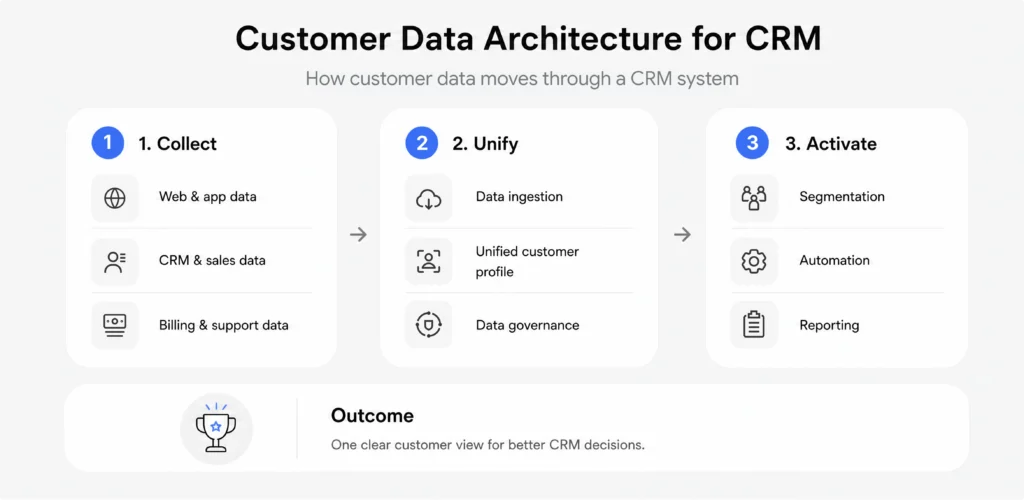
Customer relationship management (CRM) platforms are rarely just simple contact databases for storing phone numbers and company names. A modern B2B sales setup acts as the central engine for a company's growth. It handles real-time sales pipelines, keeps track of complex email histories across different teams, protects sensitive business records, and runs automated workflows. Making a platform like this run smoothly requires a careful balance: you need an interface that handles large amounts of data without performance delays, and a backend cloud infrastructure that is fast, secure, and ready to scale.
Some software engineering projects encounter limitations early on because the team treats interface design and database layout as two completely separate tasks. For a smoother deployment, teams should plan their user layouts alongside their data tables from their very first discovery sprint. When your organization maps out how to build a CRM system, you must understand that database query patterns, API payload sizes, background syncing delays, and access-control logic directly impact day-to-day business productivity.
This guide breaks down the exact database models, frontend layout strategies, and development steps needed to build a fast, enterprise-ready CRM platform.
Standard cloud applications are relatively predictable. A basic task manager or project tool mostly handles linear, isolated actions, like editing a text description, changing a due date, or checking a box. The database structures are straightforward, the data caching rules are simple, and regular row filtering maintains performance without much server strain.
An enterprise CRM system operates under an entirely different level of complexity. You are dealing with large traffic spikes, high data concurrency, and deep data dependencies. For starters, you have to manage shifting team hierarchies where access rules dynamically alter what data a sales representative can see, edit, or delete in real time.
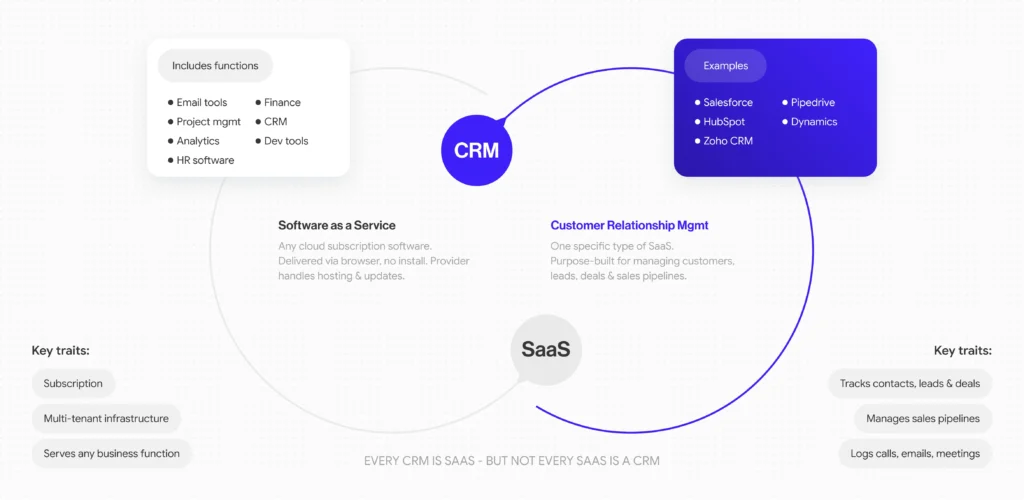
Because these platforms often serve as a central source of truth for a company’s revenue, a single customer file links out to dozens of adjacent systems at once: live VoIP phone logs, negotiation pipelines, financial invoices, marketing history, and lead scoring calculations.
To keep the application from lagging during peak business hours, your engineering team must build a highly modular CRM architecture that keeps data structures isolated but allows for fast, on-demand reporting. The system should be able to calculate moving targets, like team sales quotas, regional conversion rates, and multi-currency updates, without causing interface delays.
| Dimension/metric | Traditional SaaS products | Enterprise CRM systems |
|---|---|---|
| User role structure | Flat, uniform access permissions | Multi-tiered, dynamic visibility hierarchies |
| Data architecture | Linear relational databases | Deeply nested, stateful entity maps |
| Integration density | Secondary, low-impact external add-ons | Mission-critical, real-time background syncing |
| Automation load | Basic rule-based alert indicators | Continuous, multi-stage pipeline workflows |
| Data mutation frequency | Low-frequency manual entries | High-volume concurrent record updates |


See how we build CRM systems
We create CRM platforms where user experience, business logic, and technology work together to simplify daily operations
Contact usAn enterprise platform is unlikely to work well with a flat security model. A core pillar of clean CRM software design is setting up a dynamic system that handles access rights across various team levels seamlessly. In any corporate setup, different teams log into the application at the same time, and they each need completely different data boundaries and screen layouts.
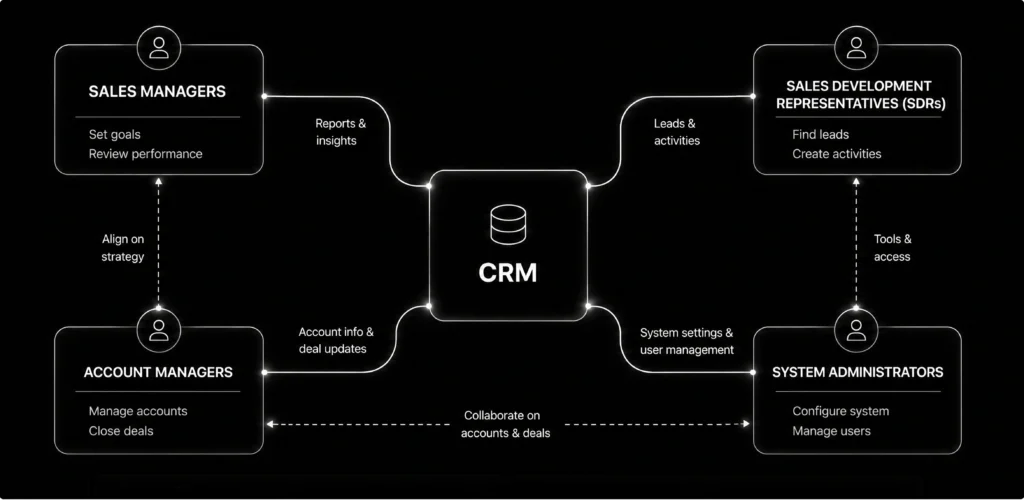
To deliver a clear user experience while keeping data secure, these complex relationships must be built into the application layout through role-based access control (RBAC). When you define specific user profiles within the technical foundation, the system can dynamically modify the interface structure.
For example, an entry-level SDR's workspace will automatically hide global financial projections or sensitive account metrics. Tying data security to the UI layout simplifies navigation paths, reduces visual clutter, and stops team members from making input errors.
A strong software platform should be designed to reflect the real-world operational steps of your business. If developers build a platform using abstract, generic templates without studying real-world office routines, the software will slow down your sales velocity and frustrate your team. If you want an interface that boosts productivity, you need to map your cards, list views, and automated notifications directly to your actual sales process stages.
To maintain high team productivity, the interface layout must simplify complex actions within the lead tracking and task management modules. Creating automated task triggers based on pipeline updates saves your team from entering manual reminders. This intentional alignment between your user paths and active business workflows turns your custom application from a basic contact list into a highly predictive sales asset.
How you design your database tables strongly influences whether your application can handle millions of active accounts as your platform scales. Unlike simple cloud apps that read flat, independent rows, a revenue platform depends on interconnected tables and complex data flows. If these boundaries are poorly defined during early development stages, the system will accumulate severe technical debt, leading to application unresponsiveness during high-volume query periods.
To keep servers responsive, teams often need to split records, like individual contacts, parent company profiles, sales opportunities, and interaction histories, into separate, independent tables. These tables must communicate through smart indexing choices and optimized data pathways. Organizing data paths carefully keeps your system fast, meaning a manager can run deep historical analytics across large datasets without causing a single screen freeze.
When internal business software feels cluttered, navigation is confusing, and action buttons change styles from page to page, team efficiency plummets. Sales representatives spend valuable hours working through complex software forms instead of closing deals, which directly increases customer acquisition costs and hurts employee retention. Keeping your team focused means applying clear CRM UX best practices that help keep essential workflows clean, readable, and highly focused.
A clear example of this is seen in the product transformation UITOP executed for Aimiable, an advanced platform built to manage internal operational efficiency. The original CRM software design had usability problems that made it incredibly difficult for users to find the data they needed. As additional features were introduced, the interface became more complex, which further reduced clarity and ease of use. Sales and operations leads found it almost impossible to read core business metrics quickly.

Our UITOP team stepped in to completely overhaul the product experience. We cleaned up the data layout, built a highly scannable navigation bar, and stripped out confusing interface steps to make complex workflows intuitive. This design update transformed the platform into an efficient business tool that teams could adopt with minimal training. And here are the main results we managed to achieve:
Handling dense information is all about smart layout hierarchy. Sales executives need access to large amounts of customer data at once, but throwing hundreds of unorganized rows onto a single screen causes visual fatigue.
The fix is progressive disclosure: showing high-level statuses first, and letting users expand detailed background files on demand without leaving their main workspace. This design approach keeps the layout clean while keeping all your advanced features just a click away, making it easy for teams to update deals accurately.
A custom business application rarely operates in isolation. To keep a business running smoothly, your platform has to share data continuously with company email servers, VoIP calling systems, accounting software, and external marketing engines. These integrations must be mapped out during the initial system design phase, or third-party connection errors will slow your entire application down.
To protect your system performance, you have to select external APIs carefully and build smart connection routes. Linking tools carelessly can create system dependencies where a single delay on an external server crashes your entire interface. Using background workers and robust caching layers insulates your core system, ensuring your interface stays fast and responsive even during large sync cycles.
To protect your core CRM platform development track from external API failures, data syncs should run separately from the primary browser thread. If a user logs a call through an integrated dialer, the screen should free up instantly instead of waiting for the external server to send a confirmation.
Routing integrations through a background queue ensures that third-party service drops or rate limits never stall your internal business operations. Building these flexible data bridges keeps your workspace clean, responsive, and reliable under heavy daily use.
Executing an enterprise-grade CRM platform development plan requires a long-term commitment to code flexibility, data security, and modular services. As your platform grows, your database needs to parse millions of rows without performance degradation. Investing in a structured CRM development strategy allows you to introduce new automation modules and custom workflows without accumulating excessive technical debt.
When displaying complex accounts or lead tables, loading thousands of heavy elements on the screen at the same time will cause any browser to become unresponsive. This frontend lag causes jerky interface scrolling and unresponsive input fields.
To keep things fast, developers use row virtualization. This frontend approach renders only the explicit data rows visible within the user's immediate viewport screen area, swapping elements out dynamically as the user scrolls up or down.
Keeping your active component count light allows your application to maintain a smooth 60 frames-per-second rendering speed, even when dealing with pipelines that hold hundreds of thousands of accounts. Pair this frontend virtualization with clean database indexes, and your managers can run complex filters across years of history without experiencing system slowdowns.
Building complex database platforms without a long-term plan introduces systemic code debt that slows down product expansion. Operational errors typically occur when teams use rigid workflow rules, omit role-based access logic, or build messy, unindexed relational schemas.
These structural mistakes can increase development costs, degrade application performance, and make future feature additions risky. Fixing these issues later can require pausing the product roadmap for a costly refactoring cycle.
Modern business platforms require deep, ongoing collaboration between visual designers and software engineers. When teams design user experiences in a vacuum, they often produce complex layouts that are incredibly expensive to program under standard server limitations. Overcoming this handoff gap requires an integrated approach where technical validity is checked during the initial wireframing sprints.A clear example of this unified system strategy is seen in how UITOP engineered a global supply chain platform.
A great example of this connected process is how our team handled the end-to-end engineering for LogiCore, an enterprise-grade cloud platform. We built the core logic, the visual design system, and the backend database architecture entirely from scratch. To keep the interface fast while managing thousands of live records, we built the main dashboards using TanStack Table paired with server-side pagination and row virtualization.
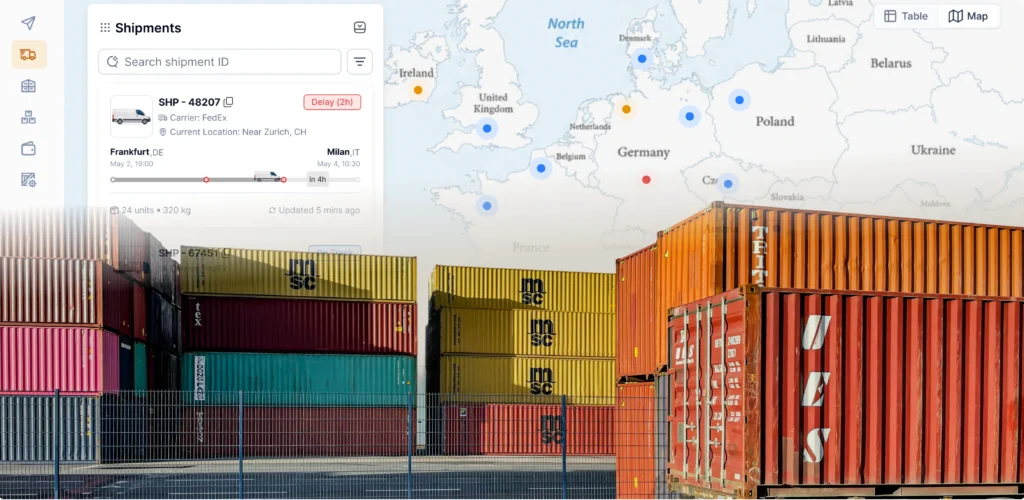
Our developers set up background polling with Zustand stores to pull fresh REST API data periodically, giving users real-time tracking metrics and instant arrival updates. We eliminated heavy frontend calculation cycles by using PostgreSQL window functions to aggregate weekly performance KPIs directly within the database layer.
For deep analytical views, we built lazy-loaded trees using Prisma ORM dynamic clauses, limiting the initial page load to 100 rows while allowing managers to expand nested files on demand. Finally, we created reusable charting components via Recharts and local state caching, letting users instantly reorganize their allocation graphs by client or date without sending a single new query to the server.
Here are the results we achieved thanks to our end-to-end product development process:
A cloud application's lifecycle typically moves through clear stages, evolving from a simple minimum viable product into a heavy enterprise-grade system. Building a scalable CRM architecture at each stage helps the system support increasing users, data volume, and business complexity without losing performance.

When deploying an early-stage MVP application, using a basic relational setup is fine for small teams. However, as you scale up your operations, letting enterprise clients add custom fields dynamically can bring a rigid database schema to a halt.
To future-proof your system, design a hybrid data-handling strategy early on. Combine stable relational tables for fixed data (like primary account IDs, dates, and emails) with flexible, indexed JSONB storage blocks to handle custom data fields smoothly.
This hybrid approach allows enterprise accounts to build custom attributes on the fly without requiring structural database updates, keeping your software updates stable, safe, and fast as your company grows.
While generic, off-the-shelf software options can support small sales setups during their early growth phases, they quickly become restrictive as your corporate operations expand. Commercial platforms rely on rigid data structures and generalized workflows that rarely match the unique realities of specialized industries. When your teams are forced to run manual workarounds outside your primary tool, your software has hit its operational limit.
Investing in tailored solutions allows you to build an application tailored exactly to your unique business logic. Custom systems give you full control over data security rules, let you create specialized external integrations, and allow you to build customized automation steps that drive competitive advantages. Our custom CRM development services can help you transform your internal software from a generic administrative tool into a powerful engine for business growth.
Splitting product delivery between an independent creative agency and a separate engineering vendor introduces unnecessary delivery risks, inflates your budget, and creates communication gaps. When designers build interfaces without real-world developer input, they often create layouts that are incredibly expensive or technically impractical to code. This results in endless modification loops and missed product launch deadlines.
To prevent these delivery delays, scaling companies partner with an integrated firm that houses both disciplines under one roof. At UITOP, a product UI/UX and development company, our designers and developers work side-by-side from day one. This approach helps ensure every design choice is validated technically right away, keeping your deployment pipeline fast, cost-effective, and fully aligned with your original product vision.
The structural choices you make around database fields, role visibility, and interface layout directly impact your application's ability to scale. Fixing interface issues and cleaning up data workflows early saves your developers from messy code debt later and helps users adopt the tool much faster.
Slabstack, a B2B CRM platform built for heavy construction materials suppliers, clearly demonstrates how thoughtful interface and data architecture can influence long-term product scalability. Its initial system was fragmented and difficult to use, requiring sales managers to move across several disconnected screens simply to manage customer information, review active deals, or create quotes.

To solve this, we delivered a full UX/UI redesign within three months, bringing scattered data into one centralized workspace. The updated platform introduced an intuitive Kanban board for lead management, easy-to-read profit margin analytics, and an integrated email tool. By achieving a clean, modular interface supported by a reusable UI kit, the redesign reduced user friction, shortened time-to-market, and gave Slabstack a scalable, market-ready foundation for stronger customer acquisition.
Build your CRM with a UX-first approach
See how we combine UX, architecture, and development to build CRM systems tailored to real business workflows
Contact usBuilding a dependable corporate platform means keeping your user experience and system architecture aligned from the very start. A successful platform effortlessly balances friendly interfaces, flexible role permissions, clear data models, and stable integrations. When you treat your custom software as a strategic, evolving business asset rather than a one-time project, you protect your launch timeline and maximize your long-term technology investment.
If your company is struggling with low system adoption, messy internal interfaces, or fixed software workflows that hold back business growth, modernizing your development framework may be the right next step.
Contact UITOP today to schedule an expert technical consultation and discuss your CRM system development project needs!
The initial milestone requires running a comprehensive product discovery phase to isolate core user challenges, detail required role visibility tiers, map out business workflows, and validate data integration parameters before writing any code.
Building a scalable framework requires separating backend data layers from frontend presentation components. Use modular data tables, apply index optimization on heavy tracking logs, and leverage efficient client-side state managers to keep performance fast.
A robust workspace typically connects seamlessly with enterprise email providers, cloud telephony services (VoIP), financial billing systems, automated marketing platforms, and business intelligence (BI) data warehouses.
Organizations should invest in custom development when off-the-shelf options fail to support their unique operational workflows, limit API customization, or become too expensive due to restrictive seat-based pricing structures.